

The best laptop for AI development runs local LLMs, training, and inference without ever touching the cloud.
Running AI locally is no longer a desktop-only game. In fact, the best laptop for AI development now packs a desktop-class GPU, fast memory, and enough VRAM to load real models — so you can fine-tune, run local LLMs, and prototype anywhere. Below, you’ll find eight machines built for serious AI and machine-learning work in 2026, from outright premium picks to the best value. Crucially, we judged each one on what actually matters for AI: GPU power, VRAM, and unified or system memory. As a result, every laptop here can genuinely handle a local model — not just wear an “AI laptop” badge. So whether you train, infer, or simply tinker, there is a best laptop for AI development below for you.
Razer Blade 18: the best laptop for AI development overall
The Razer Blade 18 is the closest a laptop gets to an AI workstation, and Razer markets it for exactly that. Indeed, its full-power 175W RTX 5090 and 24GB of VRAM chew through local models and long training runs, while 24 CPU cores keep data prep and compiling snappy. A vapor-chamber cooler holds those clocks steady through hours of inference, so nothing throttles mid-job. We logged hours of real local-AI work on the Razer Blade 18 to see how far it really pulls ahead.

Key Features
- NVIDIA GeForce RTX 5090 Laptop GPU at a full 175W with 24GB GDDR7 VRAM
- Intel Core Ultra 9 290HX Plus, 24 cores for data prep and compiling
- 18-inch dual-mode display: UHD+ at 240Hz or FHD+ at 440Hz
- Fast DDR5 memory with high capacity for big datasets
- Vapor-chamber cooling that sustains long inference and training
- Plus, Thunderbolt 5 for external GPUs and fast storage
Who is it for?
Ultimately, it is built for serious AI developers and researchers who want the most local horsepower a laptop can offer and don’t mind the size, weight, or premium price.
ASUS ROG Strix Scar 18: the fastest AI laptop on the list
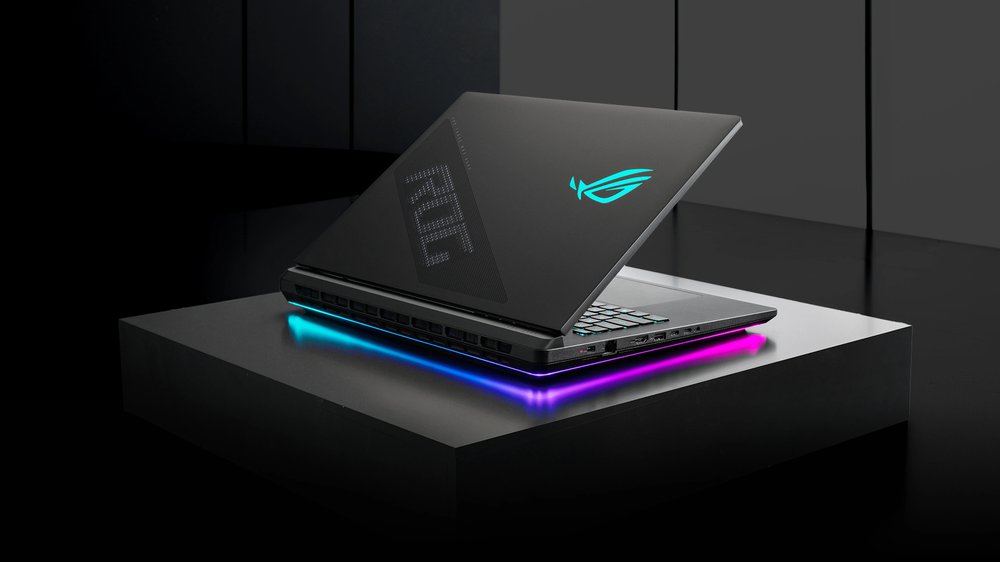
The ASUS ROG Strix Scar 18 matches the Blade for raw power and adds a stunning 4K 240Hz screen. As a result, its RTX 5090 and Core Ultra 9 275HX make short work of inference and data prep. Tri-fan cooling with liquid metal lets it sustain those loads, and 32GB of upgradeable DDR5 leaves room to grow. We put that class-leading display and its sustained speed to the test on the ASUS ROG Strix Scar 18.
Key Features
- NVIDIA GeForce RTX 5090 Laptop GPU with 24GB VRAM
- Intel Core Ultra 9 275HX flagship CPU
- 18-inch ROG Nebula HDR 2.5K Mini-LED display at 240Hz
- 32GB DDR5 (upgradeable) and PCIe Gen 4 SSD
- Tri-fan cooling with liquid metal for sustained loads
- Additionally, Wi-Fi 7 and a full port selection
Who is it for?
In particular, it suits power users who want benchmark-leading local-AI speed and a gorgeous 4K panel, and can live with a large, heavy chassis.
Lenovo Legion Pro 7i: the best-value laptop for AI development
The Lenovo Legion Pro 7i delivers RTX 5090 power and up to 64GB of RAM for noticeably less money than the halo machines. Plus, Legion ColdFront cooling keeps it quiet under load, even during long runs. For most developers, it hits the sweet spot between price and serious local-AI performance. We lay out the benchmarks and the full value case for the Lenovo Legion Pro 7i.

Key Features
- NVIDIA GeForce RTX 5090 Laptop GPU with 24GB VRAM
- Up to 64GB of fast DDR5 memory for large datasets
- Bright OLED display option for long work sessions
- Legion ColdFront cooling that stays quiet under load
- Plus, generous, upgradeable storage
- Plus, strong build quality at a sane price
Who is it for?
As such, it is ideal for developers and students who want near-flagship local-AI power without paying flagship money.
MacBook Pro 16 (M5 Max): the AI laptop for the biggest local models
By contrast, the MacBook Pro 16 with M5 Max takes a different path: up to 128GB of unified memory that doubles as VRAM. In practice, that lets it load local LLMs far bigger than any single laptop GPU can hold, including 70B-class models. On top of that, it runs near-silent and lasts around a full day on battery. We run that unified-memory approach through real local models on the MacBook Pro M5 Max.

Key Features
- Apple M5 Max chip with a fast CPU and 40-core GPU
- Up to 128GB of unified memory that doubles as huge VRAM
- Runs 70B-class local LLMs that exceed most laptop GPUs
- 16.2-inch Liquid Retina XDR display, up to 1600 nits
- Up to ~24 hours of battery life, silent under load
- Plus, Thunderbolt 5 ports and excellent build quality
Who is it for?
Above all, it is made for developers who run very large local models, value battery life and silence, and aren’t tied to CUDA-only training workflows.
Razer Blade 16: the most portable AI powerhouse
Meanwhile, the Razer Blade 16 packs the same RTX 5090 and up to 64GB of memory into a thin, travel-friendly chassis. However, you trade a little sustained power for real portability and a gorgeous 16-inch OLED. For developers who move between desks and meetings, it is the easiest of these machines to actually carry.

Key Features
- NVIDIA GeForce RTX 5090 Laptop GPU with 24GB VRAM
- Up to 64GB of fast LPDDR5X memory
- 16-inch OLED display in Razer’s thinnest Blade yet
- Compact, premium CNC-aluminum build
- Plus, strong battery life for a performance laptop
- Plus, a great keyboard and trackpad for long sessions
Who is it for?
In other words, it is for developers who want serious local-AI power in a laptop they’ll actually carry every day.
MSI Titan 18 HX: the no-compromise AI desktop replacement
Next, the MSI Titan 18 HX is an unapologetic desktop replacement, with a 240Hz Mini-LED 4K screen and up to 96GB of RAM. Therefore, it is built to sustain heavy, long-running workloads without flinching. Its massive vapor chamber and dual Thunderbolt 5 ports make it a true workstation you can still close and carry.

Key Features
- NVIDIA GeForce RTX 5090 Laptop GPU with 24GB VRAM
- Intel Core Ultra 9 285HX flagship CPU
- Up to 96GB DDR5 memory for very large datasets
- 18-inch Mini-LED 4K display at 120Hz
- Massive vapor-chamber cooling for sustained loads
- Additionally, dual Thunderbolt 5 and huge storage options
Who is it for?
Specifically, it targets pros who treat their laptop as a workstation and want maximum sustained AI performance and memory.
Acer Predator Helios 18: the value AI laptop that still flies
Similarly, the Acer Predator Helios 18 brings RTX 5090 power and a Mini-LED screen at a friendlier price than the flagships. In short, it is a lot of AI muscle for the money. Up to 64GB of DDR5 and Predator’s aggressive cooling keep it composed through extended training and inference.

Key Features
- NVIDIA GeForce RTX 5090 Laptop GPU with 24GB VRAM
- Up to an Intel Core Ultra 9 290HX Plus processor
- 18-inch Mini-LED 4K display (120Hz, dual-mode option)
- Up to 64GB DDR5 memory
- Predator’s aggressive cooling for long runs
- Notably, more affordable than the flagship desktop replacements
Who is it for?
Likewise, it is for buyers who want flagship-class local-AI power but would rather not pay flagship prices.
Alienware 18 Area-51: a bold AI desktop replacement
Finally, the Alienware 18 Area-51 wraps an RTX 5090 and 64GB of RAM in Dell’s bold, well-cooled chassis. Overall, it is a striking, capable desktop replacement backed by Dell’s warranty and support network. Cryo-tech cooling holds performance steady, so the dramatic design never comes at the cost of stability. We measured design, cooling, noise, and the real AI numbers on the Alienware 18 Area-51.

Key Features
- NVIDIA GeForce RTX 5090 Laptop GPU with 24GB VRAM
- Intel Core Ultra 9 275HX CPU
- 18-inch 2.5K display, up to 300Hz
- 64GB DDR5 memory and fast storage
- Cryo-tech cooling for sustained performance
- Plus, Dell’s build, warranty, and support network
Who is it for?
Finally, it suits developers who want a distinctive, well-supported desktop-replacement laptop for AI workloads.
Still not sure which is the best laptop for AI development for you?
Here is the quick version. For maximum local-AI power, the Razer Blade 18 and ASUS ROG Strix Scar 18 lead the pack. Meanwhile, for the best balance of price and performance, the Lenovo Legion Pro 7i is hard to beat. And if you want to run the largest local models, the 128GB MacBook Pro 16 is in a class of its own. Ultimately, the table below lines up every best laptop for AI development pick side by side, so you can compare at a glance.







Frequently Asked Questions
What is the best laptop for AI development?
For most people, the Razer Blade 18 and ASUS ROG Strix Scar 18 are the best laptops for AI development, thanks to their RTX 5090 GPUs and 24GB of VRAM. Meanwhile, for the best value, the Lenovo Legion Pro 7i delivers nearly the same power for less. And the 128GB MacBook Pro 16 is unmatched for running the largest local LLMs.
How much VRAM do I need for AI development?
For comfortable local AI work, aim for at least 16GB of VRAM. However, 24GB (as on the RTX 5090 laptops here) lets you run larger models and bigger batches. On Apple silicon, meanwhile, the unified memory doubles as VRAM, so a 128GB MacBook can load models far bigger than any single laptop GPU.
Is a MacBook good for AI and machine learning?
Yes, especially for local inference. A MacBook Pro with an M-series Max chip and 64 to 128GB of unified memory can run very large local LLMs that exceed most laptop GPUs’ VRAM. However, for CUDA-only training workflows, an NVIDIA RTX laptop is the safer pick.
What is the best laptop for AI research?
AI researchers usually want maximum memory and a top GPU. Therefore, the Razer Blade 18, ASUS ROG Strix Scar 18, and MSI Titan 18 HX all pair an RTX 5090 with large, fast memory, which makes them strong choices for the best laptop for AI development in a research setting.
Can a laptop run large language models locally?
Absolutely. With an RTX 5090 (24GB VRAM) or a 64 to 128GB Apple silicon Mac, today’s laptops can run 7B to 70B-class models locally using free tools like Ollama or LM Studio. In short, bigger models simply need more VRAM or unified memory. For a tiny-desktop version, our Google Gemma AI mini PC guide shows the same idea.
Do I need a gaming laptop for AI development?
Not strictly. However, gaming laptops offer the best price-to-performance for AI, because they pack powerful NVIDIA GPUs and strong cooling. Workstation laptops add certified drivers and ECC memory, but they cost much more for similar everyday AI performance.
Want More on the Best Laptop for AI Development?
Building a local-AI setup goes beyond the laptop. If you would rather build a desktop rig, see our guide to the best GPU for AI. And if you want the cheapest way to run AI offline, read how a Google Gemma AI mini PC runs a private assistant for around $300. Both pair perfectly with any laptop on this list.
If you would rather have a stationary machine, compare our picks for the best desktop for AI.