This Razer Blade 18 review asks whether Razer’s 2026 flagship — a full RTX 5090, a 13 TOPS NPU, and the open-source AIKit — is genuinely the best laptop for local AI, or just the most expensive.
What Is the Razer Blade 18?
The Razer Blade 18 review verdict up front: this is the first flagship gaming laptop that is genuinely engineered for on-device AI work. Also, for 2026 Razer rebuilt the Blade 18 around the NVIDIA GeForce RTX 5090 Laptop GPU — 24GB of GDDR7 VRAM at 175W, with up to 1824 AI TOPS of RTX AI — and paired it with Intel’s 24-core Core Ultra 9 290HX Plus, a processor that adds a dedicated 13 TOPS NPU for always-on AI tasks.
Still, Razer is not subtle about the pitch: it markets the Blade 18 for “desktop-class” local AI. In fact, LLM inference, fine-tuning, image generation. RAG testing — which is exactly why it tops our best laptop for AI development roundup. Plus, this review looks past the gaming benchmarks and asks what actually matters to developers: how fast does it run models, what can it handle. Is it worth the premium price?
Meanwhile, that AI focus is a real shift. Indeed, for years the 18-inch Blade was simply the most powerful gaming laptop Razer made; the 2026 version reframes the same class of hardware as a portable AI workstation, complete with published inference figures and developer tooling. Moreover, whether that reframing earns its price is what the rest of this review settles.
Razer Blade 18 Price and Where to Buy
Notably, the Razer Blade 18 starts at roughly $3,999 (around €4,099 in Europe). For AI work, the configuration that counts is the RTX 5090 build, because its 24GB of VRAM is what lets you load larger models. In fact, indeed, and that config climbs from about $4,499 to $5,200 fully specced with maxed memory and 4TB of storage.
Importantly, it is unapologetically expensive. But weigh it against the alternative: a desktop RTX 5090 workstation plus a separate travel laptop, or a year of cloud GPU rental. One machine that does both starts to look rational. On top of that, you buy it directly from Razer.
Why the Razer Blade 18 Is Built for AI Development
Crucially, plenty of laptops wear an “AI” sticker. What is more, the Razer Blade 18 is one of the few that backs it with real numbers and a software stack aimed at developers. Also, this is the heart of the review.
The AI numbers Razer actually published
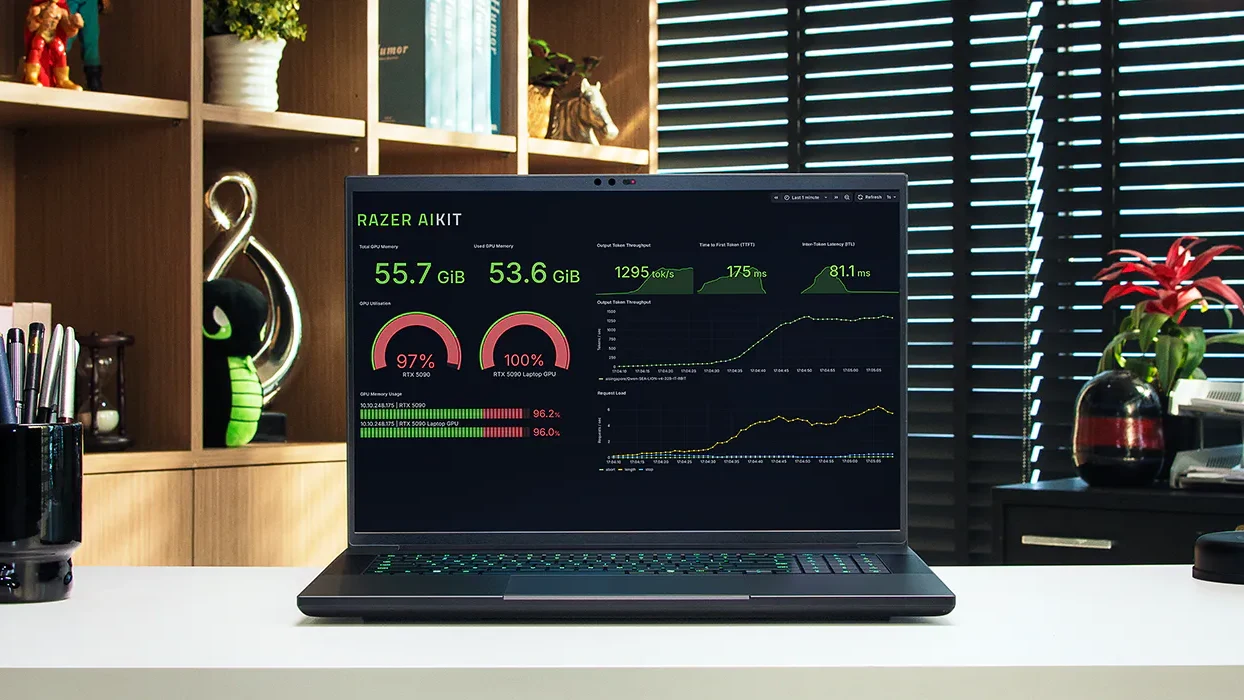
Razer quotes up to 162 tokens per second running modern models in LM Studio (it cites Qwen 3.5 35B), up to 37% faster LLM inference. Up to 2.2× faster image generation versus comparable laptops. Those gains come from the RTX 5090’s 1824 AI TOPS of RTX AI acceleration, while the Core Ultra 9 290HX Plus contributes a 13 TOPS NPU for lightweight, always-on inference that does not tie up the GPU. Still, in plain terms: chat responses stream quickly, and batch jobs finish sooner.
The 13 TOPS NPU is easy to overlook, but it earns its place. Plus, it handles lightweight, always-on AI. Meanwhile, notably, Windows Studio Effects on calls, background tasks, and small models — without waking the power-hungry RTX 5090. That keeps the GPU free for the heavy lifting and the laptop cooler and quieter during everyday work.
24GB of VRAM — how big a model can it run?
VRAM is the single most important number for local AI. 24GB is the most you can get on a laptop today. In practice the Blade 18 runs 7B and 13B models fully on the GPU with room to spare, fits quantized 27B–35B models in 4-bit at fast token rates (Razer’s own 162 tok/s figure uses a 35B model). Handles LoRA and QLoRA fine-tuning on small and mid-size models. Only 70B-class models push past it; for those, a 128GB Apple-silicon Mac is the better tool. If you are new to this, our guide to running an LLM locally walks through the exact workflow on hardware like this.
Razer AIKit and a developer-first stack
The differentiator is software. Alongside native CUDA support. As a result, so PyTorch, TensorFlow, Ollama. LM Studio all just work — Razer ships AIKit, an open-source project meant to make local LLM development easier to set up and run on its hardware. A vendor actually investing in the local-AI developer experience is rare. It is a real reason this machine stands out from rivals that share the same GPU.
The workflows it is built for
Razer designed the Blade 18 around concrete AI tasks, and the hardware maps cleanly onto them. Local LLM inference and chat run on the GPU at the token rates above. QLoRA and LoRA fine-tuning fit comfortably for small and mid-size models. As a result, you can customize a model on your own data without renting cloud GPUs. Stable Diffusion and other image generators benefit from the 2.2× speed-up and the 24GB of VRAM for higher resolutions and bigger batches. And RAG pipeline testing. Meanwhile, embedding, retrieval, and a local model in the loop — runs end to end on one machine. This keeps proprietary data entirely off the cloud. For a lot of teams, “it never leaves the laptop” is the whole reason to run AI locally.
Cooling that sustains the load
An AI job is not a 30-second benchmark; it can run for hours. The Blade 18’s vapor chamber and multi-fan layout are built for sustained workloads. Reviewers of the outgoing model consistently singled out how quiet it stays under full load. For long fine-tuning passes near your desk, sustained clocks and low noise matter more than a flashy peak.
Razer Blade 18 vs a Desktop AI Workstation
It is the fair question for anyone spending this much: why a laptop instead of a desktop RTX 5090 workstation? The honest answer is that a desktop still wins on raw ceiling. Still, more power headroom, room for bigger GPUs, cheaper memory, and quieter cooling at the same performance. If your AI work never leaves one room, a tower is the better value.
The Blade 18 wins on everything else. It is one machine for the office, the client site, the conference. The couch, with no syncing models across two rigs. Its 24GB of VRAM matches any laptop-class RTX 5090, its RAM and storage are user-upgradeable. Thunderbolt 5 lets you bolt on external storage or a dock at the desk. For developers who move. Moreover, or who simply do not want a tower humming beside them — that portability is worth the premium. The Blade 18 is not trying to beat a desktop on price; it is trying to make one unnecessary.
Design and Build: Premium Metal, Developer-Friendly Ports
The Blade 18 keeps Razer’s signature look: a clean, CNC-milled aluminum unibody in matte black that feels a clear notch above most plastic gaming laptops. It is unmistakably premium, and at roughly 3.1kg (about 7lbs) it is heavy. However, not unreasonable for an 18-inch desktop replacement you can actually fold up and carry.
The keyboard is the main compromise: key travel is shallow for a chassis this thick. As a result, heavy typists may reach for an external board. Connectivity, on the other hand, is excellent and a genuine win for developers: Thunderbolt 5, HDMI 2.1, 2.5Gb Ethernet, Wi-Fi 7, a USB-C port with 100W charging, a UHS-II SD reader. A 5MP IR webcam with Windows Hello. Crucially, the RAM and dual M.2 storage are user-upgradeable. Crucially, rare on a flagship, and exactly what you want when datasets and checkpoints grow.
The rest of the daily-use details hold up too: a large, accurate glass trackpad, a loud and clear six-speaker array. Per-key RGB managed through Razer Synapse. By contrast, which is also where you flip the display between its 240Hz and 440Hz modes.

Razer Blade 18 Review: Performance and Real AI Numbers
Outside of AI, the Blade 18 is about as fast as laptops get. The previous 18-inch Blade earned a 90% (“very good”) score at Notebookcheck and topped its class for gaming. The 2026 model carries the same full-power RTX 5090 plus the faster 290HX Plus CPU. That headroom translates directly to quick local inference, fast rendering, and snappy compiles.
Thermals and noise
This remains the Blade’s quiet superpower. Even in its highest-performance mode the cooling stays composed. As a result, a long training run does not turn your desk into a wind tunnel. What is more, a real comfort advantage over louder rivals like the Strix Scar.
Creative and compute work
The same hardware accelerates the rest of a creator-developer’s day. Blender renders, 4K video timelines, and Stable Diffusion image generation all lean on the RTX 5090’s 24GB and tensor cores. On top of that, Razer’s 2.2× image-generation figure speaks to that — while the 24-core CPU keeps exports and encodes brisk.
Display and battery
The 18-inch dual-mode IPS panel is genuinely clever: a 3840×2400 mode at 240Hz for crisp work with 100% DCI-P3 color and up to 20% more brightness than before, or a 1920×1200 mode at 440Hz for esports. Image quality is excellent at 4K and softens a little in the 440Hz mode. Battery life is fine for an 18-inch RTX 5090 machine. However, make no mistake: for real AI work you will be plugged in.
Razer Blade 18 Specs
Here is the Razer Blade 18 (2026) spec sheet at a glance, in the RTX 5090 configuration we focus on for AI work:
- GPU: NVIDIA GeForce RTX 5090 Laptop, 24GB GDDR7, 175W TGP, up to 1824 AI TOPS (RTX AI)
- CPU: Intel Core Ultra 9 290HX Plus, 24 cores, up to 5.5GHz, with a 13 TOPS NPU
- AI performance: up to 162 tokens/sec in LM Studio, up to 37% faster LLM inference, up to 2.2× faster image generation
- RAM: up to 64GB DDR5 (two user-upgradeable SO-DIMM slots)
- Display: 18-inch dual-mode IPS — UHD+ 3840×2400 at 240Hz or FHD+ 1920×1200 at 440Hz, 100% DCI-P3, ~20% brighter
- Storage: dual M.2, up to 4TB Gen5 / 8TB Gen4 (user-upgradeable)
- Cooling: vapor chamber + multi-fan, built for sustained loads
- Ports: Thunderbolt 5, HDMI 2.1, 2.5Gb Ethernet, USB-C (100W), UHS-II SD, 5MP IR webcam
- Wireless: Wi-Fi 7, Bluetooth 5.4
- Weight: approximately 3.1kg (about 7lbs)
Razer Blade 18 spec infographic: 24GB VRAM RTX 5090, 24-core Core Ultra 9 290HX, up to 162 tokens per second, 64GB DDR5, 18-inch UHD+ 240Hz display, up to 4TB Gen5 storage.
How the Razer Blade 18 (2026) Compares to the ASUS ROG Strix Scar 18
Pros and Cons
What we liked
- Purpose-built for AI: RTX 5090 (24GB, RTX AI) plus a 13 TOPS NPU
- Published, real numbers: up to 162 tokens/sec and 37% faster LLM inference
- Razer AIKit gives local-LLM developers a real, vendor-backed toolkit
- Vapor-chamber cooling that stays remarkably quiet under sustained load
- User-upgradeable RAM and dual M.2 storage — rare on a flagship
- Thunderbolt 5, Wi-Fi 7, and a premium CNC-aluminum build
What could be better
- Expensive, especially in the RTX 5090 configuration
- Shallow keyboard travel for such a thick chassis
- 24GB VRAM still caps you below 70B-class models (a Mac handles those)
- Image quality softens in the 440Hz display mode
- It is a heavy, plug-in-to-perform desktop replacement, not an ultraportable
Who Should Buy the Razer Blade 18?
The Razer Blade 18 is for the developer or researcher who wants real, desktop-class AI power in something they can still close and carry. If you run local LLMs, fine-tune models, generate images, or test RAG pipelines on the move. Importantly, and you value premium build, quiet cooling. A vendor that actually supports local AI — it is close to ideal.
It is not the pick if you are on a budget; the best laptop for AI development roundup has stronger value options like the Lenovo Legion Pro 7i. It is also not the answer if your models need more than 24GB of memory. In fact, a 128GB MacBook Pro’s unified memory loads bigger LLMs than any single laptop GPU. And committed typists should try the shallow keyboard before buying.
Two buyers should look hardest at it. The first is the independent AI developer or consultant who needs one powerful machine for everything and travels with it. Indeed, the Blade 18 replaces a desktop and a laptop at once. The second is the researcher or student who wants to fine-tune and prototype on real hardware, keep their data local. Still have a flagship gaming and creative laptop after hours.
Final Verdict: Is the Razer Blade 18 Worth It?
The 2026 Razer Blade 18 is the most complete AI-development laptop you can buy right now. It is the rare machine that pairs the fastest mobile GPU and a 24-core, NPU-equipped CPU with real, published AI performance and an actual developer toolkit in Razer AIKit. Notably, all in the best-built, quietest-running chassis in its class. The caveats are honest: it is expensive, the keyboard is shallow, and you will pay a premium for the badge. For serious local AI, though, those are easy trade-offs. This is the laptop to beat.
Frequently Asked Questions
Is the Razer Blade 18 good for AI development?
Yes — it is arguably the best laptop for it right now. The RTX 5090 build has 24GB of VRAM plus RTX AI, the Core Ultra 9 290HX Plus adds a 13 TOPS NPU. Razer publishes real figures (up to 162 tokens/sec, 37% faster inference). It also ships AIKit, an open-source toolkit for local LLM development.
How fast is the Razer Blade 18 for running LLMs?
Razer quotes up to 162 tokens per second in LM Studio with a modern 35B-class model. Up to 37% faster LLM inference than comparable laptops. In everyday use that means responses stream quickly and batch jobs finish sooner.
How much VRAM does the Razer Blade 18 have?
The RTX 5090 configuration has 24GB of GDDR7 VRAM at 175W. As a result, the most available on a current laptop GPU. That is enough for 7B to 13B models at full speed and quantized 27B to 35B models.
What processor is in the 2026 Razer Blade 18?
The 2026 Razer Blade 18 uses Intel’s Core Ultra 9 290HX Plus, a 24-core flagship that boosts to 5.5GHz and includes a 13 TOPS NPU for always-on AI tasks. Meanwhile, strong for the CPU-bound parts of AI work like data preparation and compiling.
How much does the Razer Blade 18 cost?
It starts at about $3,999. The RTX 5090 build that matters for AI runs from roughly $4,499 to around $5,200 fully specced with maxed memory and 4TB of storage.
Can the Razer Blade 18 run large language models locally?
Yes. With 24GB of VRAM, RTX AI, and native CUDA support, it runs open models like Gemma, Llama, Mistral. Qwen locally through Ollama, LM Studio, or Razer’s own AIKit. Models larger than 24GB are better suited to a high-memory Mac.
Is the Razer Blade 18 better than the ASUS ROG Strix Scar 18?
They share the RTX 5090, so raw gaming performance is close. The Blade 18 pulls ahead for AI work: published inference numbers, the 290HX Plus with an NPU, the AIKit toolkit, quieter cooling, and a more premium build. The Strix Scar counters with a Mini-LED screen and a lower entry price.
Does the Razer Blade 18 have Thunderbolt 5?
Yes. The 2026 model upgrades to Thunderbolt 5, alongside HDMI 2.1, 2.5Gb Ethernet, Wi-Fi 7, USB-C with 100W charging, and a UHS-II SD reader. Still, so external GPUs, fast storage, and multi-monitor setups are all easy.
Want More Than This Razer Blade 18 Review?
See how the Razer Blade 18 stacks up against every rival in our best laptop for AI development roundup, or browse the best GPU for AI guide if you are building a desktop instead.