Disclosure: this article contains affiliate links. If you buy through them, we may earn a commission at no extra cost to you. It never decides our picks. Affiliate Disclosure · How we use AI
The Mac Studio M4 Max review for people whose local models keep outgrowing a Mac Mini: enough memory bandwidth to make 70B genuinely usable, in total silence.
What Is the Mac Studio M4 Max?
This Mac Studio M4 Max review covers Apple’s fastest small desktop for AI work. The Mac Studio M4 Max is what you buy when the Mac Mini is close but not quite quick enough. Its wider chip carries two memory controllers instead of one. So it pushes bandwidth to as much as 546 GB/s, against the Mini’s 273 GB/s.
That extra bandwidth is the whole story. For big language models, the memory, not the compute, is the speed limit. So where a Mac Mini loads a 70B model but starts to slow down, the Mac Studio keeps that same model at a usable pace, quick enough to run a 70B model locally as your daily driver. And it does so in dead silence.
It is also a superb creative workstation. So the same box that serves your local models will happily edit video the rest of the day. For a certain kind of professional, that dual life is the appeal.

Mac Studio M4 Max Price and Where to Buy
Update, October 2026: Apple replaced this model with the Mac Studio M5 Max on September 22, 2026. It starts at $2,499 with 36GB, goes up to 128GB again and reaches about 614 GB/s of memory bandwidth, while a new M5 Ultra version starts at $5,499. The M4 Max reviewed here now survives only as leftover and refurbished stock, so our buy link opens the current model. Everything below describes the M4 Max as we reviewed it.
The Mac Studio M4 Max started at $2,499 at launch. That remains the number to anchor on for its place in the range. Be aware, though, that 2026 memory prices pushed the well-specified builds higher. Apple also retired the 128GB option. So a current 64GB build costs more than the launch headline.
One buying note matters most. The chip comes in two versions, and only the higher one reaches 546 GB/s of bandwidth. The cheaper binned chip runs at 410 GB/s. Since bandwidth is exactly what you are paying for here, choose the faster chip rather than saving a little on the base one.
Why Memory Bandwidth Is the Point
Two machines can hold the same 70B model and still feel completely different to use. That is because loading a model and running it quickly are separate problems. Capacity decides whether it fits. Bandwidth decides how fast it answers.
The M4 Max moves memory at up to 546 GB/s, roughly double the Mac Mini’s 273 GB/s. On a 70B model, that gap shows up directly as about twice the tokens per second. In practice, that is the difference between a model you tolerate and one you actually work with. So once your models settle into 70B territory, the Studio is the Apple desktop that keeps right up with them.
| Model size | Memory it needs | Experience on the M4 Max (up to 546 GB/s) |
|---|---|---|
| 7B to 8B | ~5 to 8 GB | Instant; runs while everything else stays open |
| 13B | ~10 to 14 GB | Fast and comfortable for all-day use |
| 32B | ~20 to 24 GB | Smooth, the everyday sweet spot |
| 70B (quantized) | ~40 to 48 GB | Genuinely usable, around 18 to 22 tokens per second |
| 128B+ MoE | 64 GB+ | Loads on 64GB configs; best for batch and overnight work |
What Local AI Models Can the Mac Studio M4 Max Run?
Using MLX on a 64GB M4 Max, real-world figures land roughly here at common quantization. Numbers move with runtime and settings, so treat them as ballpark:
- 8B models (Llama 3.1): around 58 to 68 tokens per second, effectively instant.
- 14B models (Qwen 2.5): about 38 to 45 tokens per second.
- 32B models (Qwen, Q8): roughly 24 to 30 tokens per second, very comfortable.
- 70B models (Q4): about 18 to 22 tokens per second, and this is the headline. A Q4 70B uses around 43GB, so it fits in 64GB with room for context.
Two practical notes. First, a full-precision 70B will not fit in 64GB, so quantized is the way here. Second, MLX runs a little faster than the alternatives on this silicon. Just as important, the Studio holds these speeds under long sessions without throttling.
Mac Studio M4 Max Specifications
Key Mac Studio M4 Max specs for the AI-focused build:
| Specification | Mac Studio M4 Max |
|---|---|
| Chip | Apple M4 Max, 14 or 16-core CPU, 32 or 40-core GPU |
| Neural Engine | 16-core, 38 TOPS |
| Memory | Unified, 64GB minimum on 2026 configs (128GB discontinued) |
| Memory bandwidth | Up to 546 GB/s (410 GB/s on the base chip) |
| Storage | 512GB up to 8TB SSD |
| Ports | 4 Thunderbolt 5, 2 front USB-C, front SDXC, 2 USB-A, HDMI, 10GbE |
| Wireless | Wi-Fi 6E, Bluetooth 5.3 |
| Size | 3.7 x 7.7 x 7.7 in, 6.1 lb |
| Power | 480W maximum, roughly 120 to 150W under real AI load |
| Price | From $2,499 at launch (2026 configs higher) |
Design, Silence and Ports
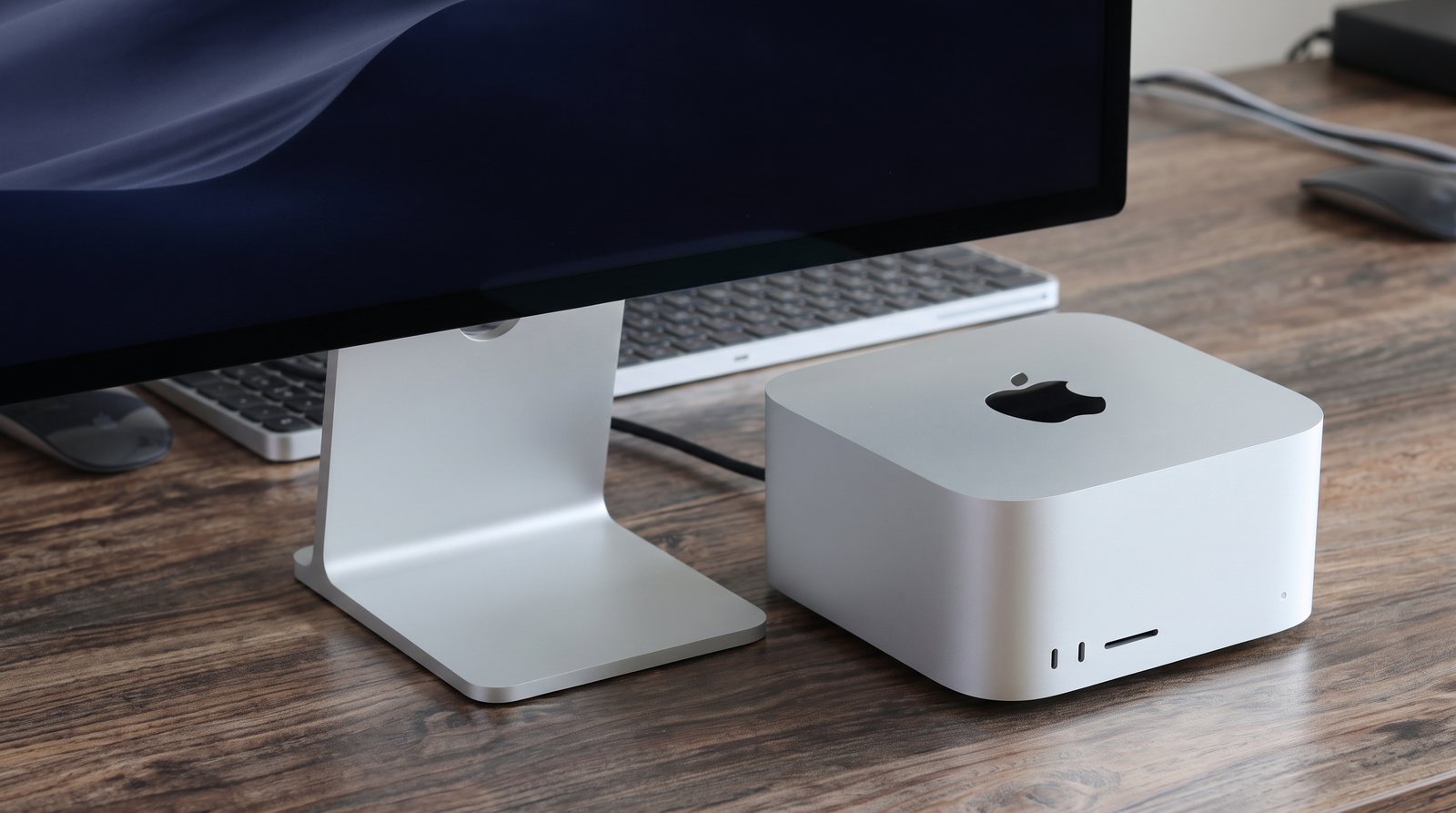
The Studio is a dense little aluminium block that sits under a monitor and disappears. The headline, though, is how quiet it stays. Reviewers run it flat out on inference for a full day and still call it dead silent, with no thermal throttling. For an always-on model server on your desk, that matters more than any benchmark.
Connectivity is another place the Studio quietly shines. You get four Thunderbolt 5 ports on the back. Then there are two more USB-C on the front, a front SDXC card slot, and 10-gigabit Ethernet as standard. For a working creative or developer setup, that front-facing access alone earns its keep.
Not Just AI: A Serious Video Editing Box
This is worth saying plainly, because it changes the value maths. The same machine that runs your local models is one of the best small video-editing desktops you can buy. The M4 Max’s media engines chew through high-resolution timelines. Meanwhile, reviewers measure large gains over the previous generation on export and encode.
So if your day is part local AI and part creative work, you are not buying a single-purpose inference box. That dual role is a big part of why professionals pick the Studio over a cheaper machine that only does one job.
How the Apple Mac Studio M4 Max Compares to the Mac Mini M4 Pro
Both desktops run on the same Apple silicon family, so the choice really comes down to how much headroom your models need. The Mac Mini M4 Pro is a genuinely capable, lower-cost starting point, and the Mac Studio M4 Max builds on it with far more memory bandwidth and unified memory for larger local models. Here is how the two compare side by side.
| Feature | Apple Mac Studio M4 Max | Mac Mini M4 Pro |
|---|---|---|
| Memory bandwidth | Up to 546 GB/s | 273 GB/s |
| 70B model at Q4 | About 18 to 22 tokens/sec | About 3 to 5, strains |
| Max unified memory | 64GB (2026 configs) | 48GB |
| GPU cores | Up to 40 | Up to 20 |
| Ports | 4 Thunderbolt 5, front USB-C and SDXC | 3 Thunderbolt 5, no SD |
| Noise | Silent, no throttle over a full day | Near silent |
| Price | From $2,499 (2026 higher) | From $1,599 |
In short, the Mac Mini M4 Pro handles everyday models with ease, while the Mac Studio M4 Max is the one to reach for once you want 70B models running at a comfortable pace.
Pros and Cons
What we liked
- Up to 546 GB/s of bandwidth makes 70B models genuinely usable, not merely loadable
- Dead silent even after a full day of sustained inference, with no throttling
- Low real-world power for the performance, around 120 to 150W under AI load
- Excellent ports: four Thunderbolt 5, front USB-C and a front SDXC card slot
- Doubles as a top small video-editing workstation, so one box does two jobs
- Unified memory holds large models without a discrete card and its VRAM ceiling
- Compact 6.1 lb block that hides neatly under a monitor
What could be better
- Memory and storage are soldered, so there is zero upgrade path after purchase
- No CUDA, so many NVIDIA-first AI tools need workarounds or are off the table
- The 2026 memory-price rise and the loss of the 128GB option pushed prices up
- Apple’s storage upgrades are very expensive per terabyte
- You must pay for the higher chip to get 546 GB/s; the base one is only 410
Who Should Buy the Mac Studio M4 Max?
Buy it if you run local models daily and value silence and build quality over raw graphics power. Ideally, your work lives around 70B. In that case it is the sweet spot for professionals who also edit video. It also suits anyone who found the Mac Mini M4 Pro close but not quite fast enough.
Skip it if you need more than 64GB of memory. There, the GMKtec EVO-X2 and its 128GB go further for the money. Skip it too if your work is video generation or training, which want the CUDA of an RTX machine.
Final Verdict
Overall, the Mac Studio M4 Max is the most complete quiet workstation in this lineup. Its bandwidth turns 70B models from a party trick into daily tools. Meanwhile, it runs in genuine silence, and it edits video just as smoothly as it serves models. Still, the compromises are the familiar Apple ones. Nothing is upgradeable, there is no CUDA, and 2026 pricing is steeper than the launch figure suggests.
Weighed as the fastest quiet workstation in our best desktop for AI lineup, it is hard to beat for the professional who wants silence and speed together. So we rate the Mac Studio M4 Max 4.5 out of 5. It is the best all-round Apple desktop for local AI, if the price and the sealed design suit you.
Frequently Asked Questions
Is the Mac Studio M4 Max good for AI?
Yes, it is the best all-round Apple desktop for local AI. Its up-to-546 GB/s bandwidth runs 70B models at a usable 18 to 22 tokens per second. It stays silent under load, and it doubles as a strong video-editing machine.
Can the Mac Studio M4 Max run 70B models?
Yes, and comfortably. A 4-bit 70B model uses around 43GB, so it fits in the 64GB build with room for context, and runs at 18 to 22 tokens per second. That is about twice a Mac Mini M4 Pro on the same model.
Mac Studio M4 Max vs Mac Mini M4 Pro: which is better for AI?
For models up to about 32B, the cheaper Mac Mini M4 Pro is enough. Once you want fast 70B work, the Mac Studio M4 Max is worth the step up, because its 546 GB/s bandwidth roughly doubles the tokens per second.
What is the memory bandwidth of the M4 Max?
The M4 Max reaches up to 546 GB/s on the higher chip, and 410 GB/s on the base binned chip. Both are far above the Mac Mini M4 Pro’s 273 GB/s, which is why the Studio is faster on large models.
How much does the Mac Studio M4 Max cost?
It launched at $2,499, which remains its reference price. The M5 Max model that replaced it in September 2026 also starts at $2,499, now with 36GB and up to 128GB. Still, 2026 memory rises pushed 64GB configurations higher, and Apple discontinued the 128GB option. So check the current price at checkout.
Can you upgrade the RAM in the Mac Studio M4 Max?
No. Both the unified memory and the SSD are soldered to the board. So the configuration you choose at purchase is permanent. Buy as much memory as you expect to need.
Is the Mac Studio M4 Max good for video editing?
Very. Its media engines handle high-resolution timelines with ease, and post large gains over the previous generation on export. So one silent box handles both local AI and heavy creative work.
What are the Mac Studio M4 Max specs?
It uses the M4 Max chip with up to a 16-core CPU and 40-core GPU, 64GB or more of unified memory at up to 546 GB/s, four Thunderbolt 5 ports, an SDXC slot, and 10-gigabit Ethernet.
Want More?
Considering other shapes of machine? Our best laptop for AI development guide covers the portable options. And if you need CUDA, the best GPU for AI roundup ranks the cards to build around. If the Studio is more than you need, read our Mac Mini M4 Pro review next.