Disclosure: this article contains affiliate links. If you buy through them, we may earn a commission at no extra cost to you. It never decides our picks. Affiliate Disclosure · How we use AI
The GMKtec EVO-X2 review for anyone chasing the biggest local model: the cheapest honest route to 128GB of AI memory, at roughly half the price of NVIDIA’s box.
What Is the GMKtec EVO-X2?
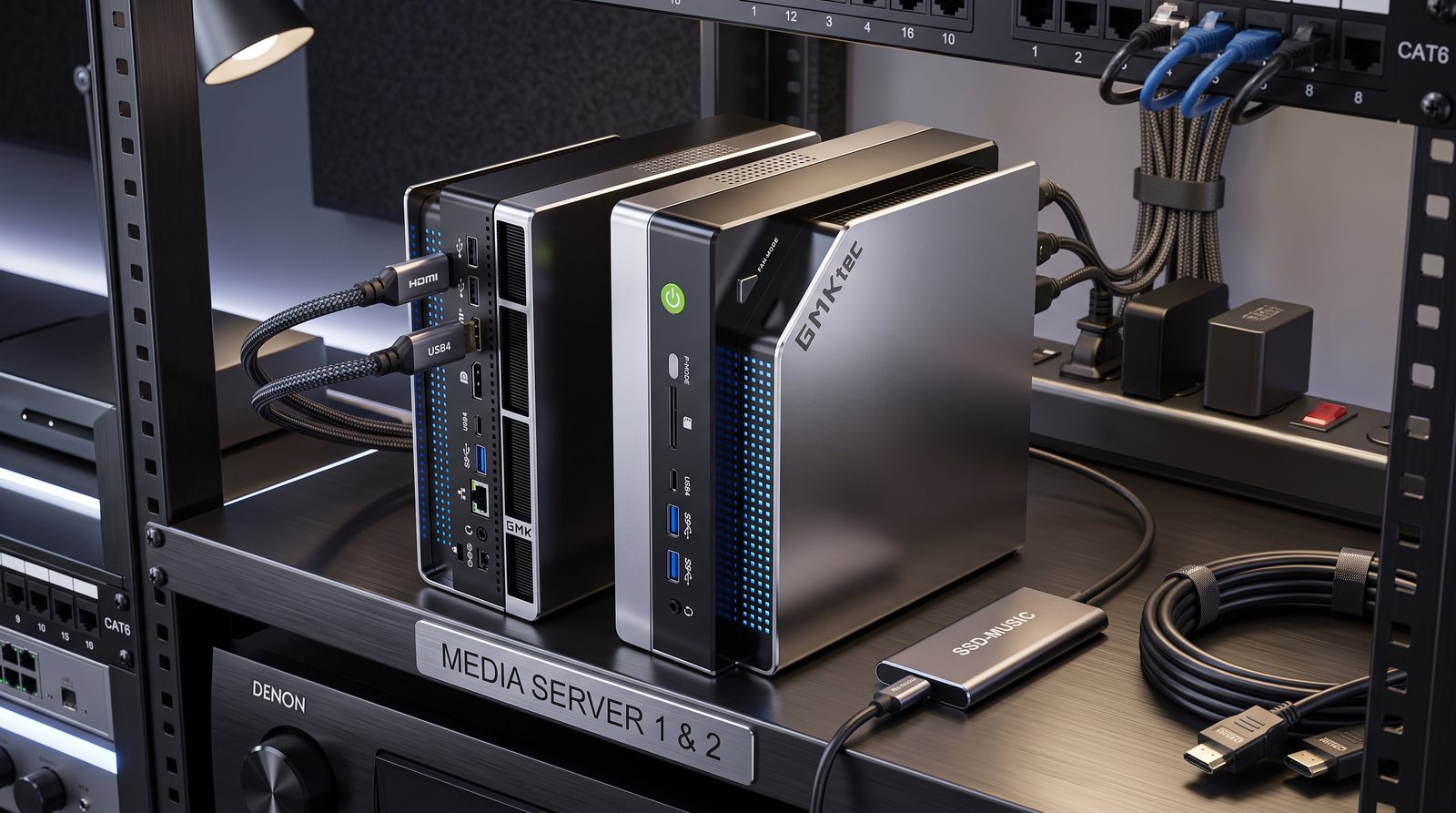
This GMKtec EVO-X2 review looks at the AI mini PC that quietly undercuts everything else on memory. The EVO-X2 is a compact mini PC built on AMD’s Ryzen AI Max+ 395 chip. Its whole reason to exist is memory. It carries up to 128GB of unified memory, more than any consumer graphics card offers.
That headroom changes what you can run. In practice, it holds a 70B model at 4-bit with room to spare. It even runs large mixture-of-experts models in the 120B to 235B class at usable speeds. Meanwhile, it does all this from a box that hides behind a monitor.
And if your goal is simply to load the largest model you can for the least money, nothing here comes close on value.
GMKtec EVO-X2 Price and Where to Buy
For AI, the configuration that matters is the 128GB model with a 2TB drive. It launched at $1,999, but 2026 memory prices pushed it up sharply. In October 2026 it sold for $3,649.99 on Amazon, with the 64GB version at $2,399.99. Smaller 32GB and 64GB versions cost less. Still, they defeat the point, because the memory is the entire reason to choose this machine.
Now put that price next to the alternatives. A 128GB NVIDIA DGX Spark costs roughly double. And no Apple desktop reaches 128GB at anything like this money. So for pure memory per dollar, the EVO-X2 is in a class of one.
The 128GB Unified Memory Advantage
Local AI lives and dies on memory. A model has to fit before it can run. And the EVO-X2 can dedicate as much as 96GB of its shared pool to the graphics side. So it holds models that a 32GB RTX 5090 or a 48GB Mac Mini cannot touch.
Because the memory is unified, the chip, the Radeon graphics and the neural engine all draw from the same LPDDR5X pool. So you are not paying for separate video memory on top. That is how a mini PC that costs under $3,700 ends up able to load a 235B mixture-of-experts model at all. On raw capacity for the price, it simply wins.
What Local AI Models Can the EVO-X2 Run?
Once ROCm drivers are in place, independent testing on the EVO-X2 lines up roughly like this at common quantization. Treat the figures as single-user ballpark:
- gpt-oss 20B: around 46 to 65 tokens per second, quick and comfortable.
- gpt-oss 120B (mixture-of-experts): roughly 33 to 45 tokens per second, impressive for a mini PC.
- Qwen3 Coder 30B (MoE, Q8): about 50 tokens per second.
- Qwen3 32B (dense): closer to 9 or 10 tokens per second, usable but not fast.
- Dense 70B (Q4): around 5 tokens per second, fine for one patient user.
- Qwen3 235B (MoE): the vendor and early reviewers report roughly 11 tokens per second, remarkable for the class.
So the pattern is clear. It loves mixture-of-experts models, where only a slice of the parameters is active at once. Meanwhile, it is merely adequate on big dense models. For most people chasing large local models, MoE is exactly what they want to run.
How Fast Is Prompt Processing?
One thing to know before you buy is prompt-processing speed. The EVO-X2 generates tokens at a competitive pace. It reads long prompts more slowly, though. On a 120B model it reads a prompt at around 340 tokens per second. By comparison, the NVIDIA DGX Spark manages roughly 1,700.
Why does that matter? Prompt processing happens before the answer starts. So on long prompts, document retrieval or coding agents, the EVO-X2 pauses noticeably before it replies. Short chats feel fine. Long-context work feels sluggish. The root cause is simple: an integrated graphics engine paired with server-sized memory. And no firmware update changes it.
Setup and Software: ROCm and Linux
Budget some patience for setup. Out of the box, the EVO-X2 runs local models far slower than it should. The big gains only arrive after you install AMD’s ROCm drivers. And reviewers consistently find Linux faster than Windows for this work.
None of that is a dealbreaker for the tinkerers this machine is aimed at. Still, it is a real difference from the NVIDIA world, where CUDA is mature and mostly just works. So if you want to plug in and forget, this is not that machine. But if you enjoy dialling a system in, the payoff is 128GB of capacity for around two thousand dollars.
GMKtec EVO-X2 Specifications
Key GMKtec EVO-X2 specs for the AI configuration:
- APU: AMD Ryzen AI Max+ 395, 16 cores / 32 threads, up to 5.1GHz
- Graphics: Radeon 8060S, 40 compute units (RDNA 3.5)
- NPU: XDNA 2, 50 TOPS (about 126 TOPS across the platform)
- Memory: up to 128GB LPDDR5X-8000 unified, soldered
- Bandwidth: about 256 GB/s (nearer 215 GB/s measured)
- Storage: 2TB PCIe 4.0 SSD plus a second M.2 slot
- Connectivity: 2 USB4, HDMI 2.1, 2.5G Ethernet, Wi-Fi 7
- Size: 193 x 186 x 77 mm, about 3.6 lb
- Power: 230W adapter, 120W sustained chip, plus a Fan Mode button
- Price: $3,649.99 for 128GB / 2TB in October 2026 (launched at $1,999)
Design, Cooling and Noise
The chassis is a small, sensible box, a little under eight inches on its longest side. So it tucks behind a monitor or on a shelf without fuss. A neat touch is the physical Fan Mode button on the case. Tap it to swap between a quiet profile and a full-speed one, without diving into software.
Left in its quiet mode, it is easy to leave running overnight. So it suits its role as an always-on model server. Under a heavy sustained load, with fans opened up, it is audible, as any 120W chip in a small case will be. Still, it never approaches gaming-tower volume.
How the GMKtec EVO-X2 Compares to the NVIDIA DGX Spark
Pros and Cons
What we liked
- The cheapest route to 128GB of unified memory for local AI, at roughly half a DGX Spark
- Loads 70B dense and 120B to 235B mixture-of-experts models no other mini PC in class can
- Strong token generation on MoE models, around 33 to 45 tokens per second on gpt-oss 120B
- Genuinely compact and low power, a 120W chip in a box that hides behind a monitor
- A physical Fan Mode button gives you quiet or full-speed cooling without software
- Good I/O for the size: dual USB4, HDMI 2.1, Wi-Fi 7 and a spare M.2 slot
- Linux-friendly, which suits a self-hosted, always-on model server
What could be better
- Prompt processing is roughly five times slower than NVIDIA, so long-context work drags
- ROCm and Vulkan need setup to hit rated speed; out of the box it is slow
- Dense 70B runs at only about 5 tokens per second, so it is a single-user machine
- Only 2.5-gigabit networking, where rivals at this price offer faster wired options
- Memory is soldered, so the configuration you buy is the one you keep for good
Who Should Buy the GMKtec EVO-X2?
Buy it if you want the largest possible local model for the least money, and you do not mind a little setup. In that case it is the natural pick for tinkerers and self-hosters. It suits people who run big mixture-of-experts models, value silence and low power, and are happy in Linux.
Skip it if your work leans on long prompts, document retrieval or busy coding agents, where its slow prompt processing will frustrate you. Skip it too if you need the mature CUDA stack. For both, the NVIDIA DGX Spark costs about twice as much, but answers both complaints.
Final Verdict
Overall, the GMKtec EVO-X2 is the value story of this whole lineup. Nothing else puts 128GB of AI memory on your desk for around two thousand dollars. And on mixture-of-experts models, it generates tokens fast enough to feel genuinely useful. Still, its weaknesses are real. Prompt processing is slow, the software needs coaxing, and dense big models only trickle out answers.
Judged as the cheapest way into serious local capacity in our best desktop for AI lineup, it earns its place. So we rate the GMKtec EVO-X2 3.9 out of 5. It is an outstanding capacity-per-dollar machine for patient tinkerers, held back by slow prompts and ROCm friction.
Frequently Asked Questions
Is the GMKtec EVO-X2 good for AI?
Yes, if your priority is capacity. Its up-to-128GB of unified memory loads 70B and large mixture-of-experts models for about $3,650. The trade-off is slow prompt processing and some setup.
Can the GMKtec EVO-X2 run 70B models?
Yes. A 70B model at 4-bit fits comfortably in its 128GB pool and runs at roughly 5 tokens per second. It is happier still with mixture-of-experts models like gpt-oss 120B, which reach 33 to 45 tokens per second.
How much memory can the EVO-X2 use for AI?
The EVO-X2 carries up to 128GB of unified memory and can dedicate as much as 96GB to the graphics side. That is more than a 32GB RTX 5090 or a 48GB Mac Mini can offer, which is its main selling point.
Why is prompt processing slow on the EVO-X2?
Prompt processing is compute-bound, and the EVO-X2 pairs an integrated graphics engine with server-sized memory. So it generates tokens quickly but reads long prompts about five times slower than an NVIDIA DGX Spark.
GMKtec EVO-X2 vs NVIDIA DGX Spark: which is better?
Both carry 128GB of unified memory. The EVO-X2 wins on price, at roughly half the cost. The DGX Spark wins on prompt-processing speed and the mature CUDA ecosystem. Choose by budget versus speed.
How much does the GMKtec EVO-X2 cost?
The 128GB, 2TB configuration that suits local AI cost $3,649.99 on Amazon in October 2026, up from $1,999 at launch. Smaller 32GB and 64GB versions are cheaper, but miss the point, since the large memory is the reason to buy it.
Does the EVO-X2 run Windows or Linux for AI?
It runs either, but reviewers consistently find Linux faster for local AI. You should also install AMD’s ROCm drivers to reach the rated speeds. Out of the box, throughput is noticeably lower.
Is the GMKtec EVO-X2 good for Stable Diffusion?
It is usable but not a strength. The same integrated-graphics limit that slows prompt processing also caps image-generation speed. So a discrete NVIDIA card is clearly quicker for image work.
Want More?
Weighing a mini PC against other shapes of machine? Our best laptop for AI development guide covers the portable route. And the best GPU for AI roundup ranks the cards if you would rather build a tower. If its slow prompt processing worries you, read our NVIDIA DGX Spark review next.