Disclosure: this article contains affiliate links. If you buy through them, we may earn a commission at no extra cost to you. It never decides our picks. Affiliate Disclosure · How we use AI
The best part of this ReRender AI review is not the render itself. It is that the building still looks like your design.
Most AI renderers are delighted to make you a beautiful house. Hand them a faceted, awkward, half finished model of your house and the flattery usually stops. This ReRender AI review starts there.
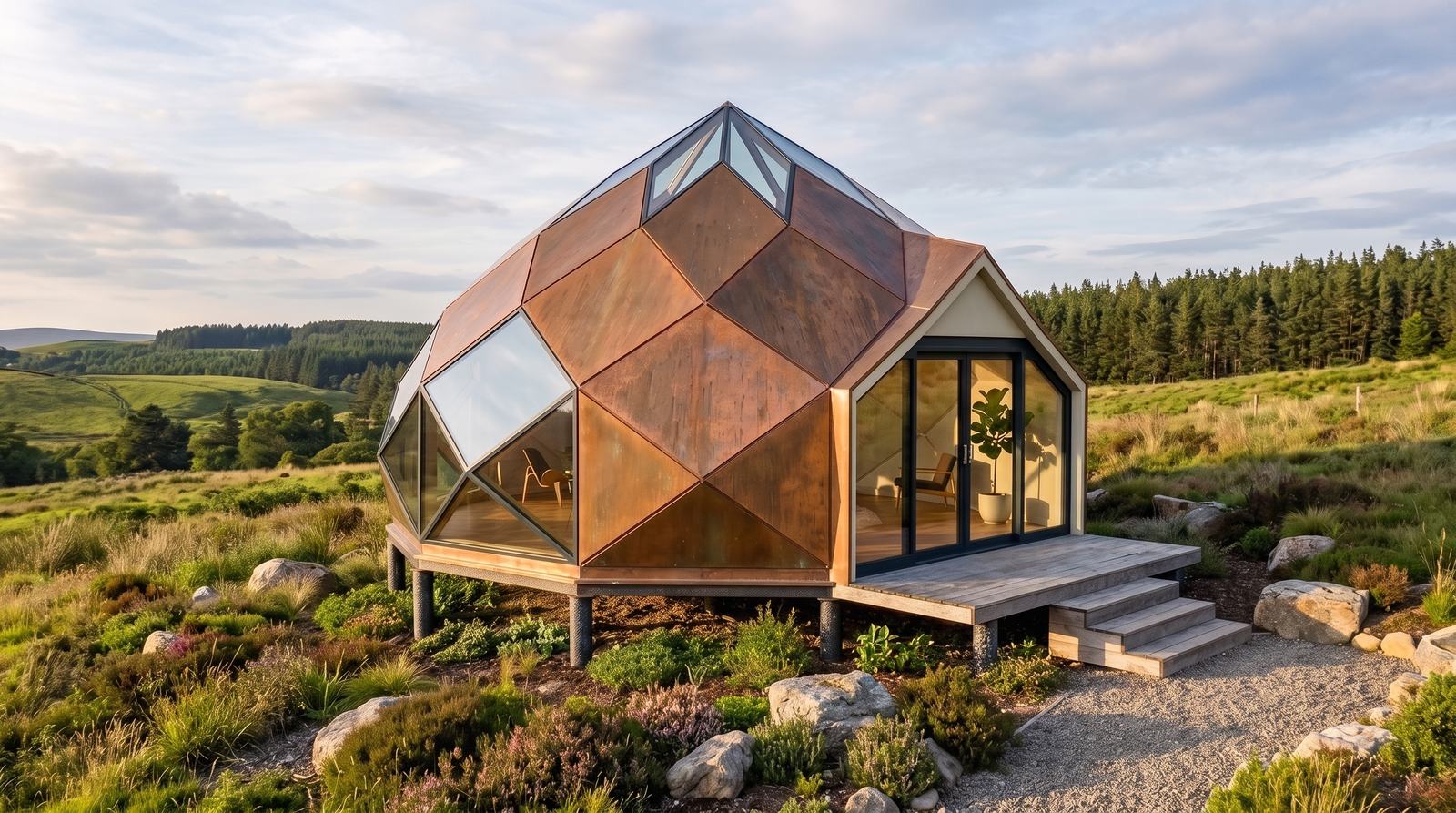
Instead of a polished professional render, the tool got a rough viewport screenshot of a real project. A dome cabin raised on stilts, with copper panels, triangular glazing and a timber deck. Then it got several sessions of pressure.
What came back reframed the whole article. ReRender AI is far less of an image generator than it looks. It behaves like an architectural workspace, where a finished render is where the work starts rather than where it stops.
What Is ReRender AI?
ReRender AI is an architectural visualization platform built by Stylefie, Inc. It runs entirely in the browser. The promise is simple: upload an architectural input, choose how it should look, and get photorealistic alternatives back in seconds.
That input can be a SketchUp or Rhino viewport screenshot, a sketch, a floor plan, an existing render or a photograph of a finished building. Each generation returns four variants. A single upload therefore gives you something to compare.
However, the render itself is only the first layer. Around it sit exterior and interior rendering, sketch to image, style reference moodboards, material replacement and AI lighting. Then come an add people tool, 3D camera controls, parametric 3D objects, a 2D CAD block library, enhancement and upscaling. Then image to video, and a public API.
Alongside all of that runs RenderChat, a separate conversational app. There the same render is refined by typing follow up instructions instead of adjusting controls.
One naming note before the tests. You will see the product written as ReRender, ReRender AI, rerender.ai or rerenderai.com, and a search for re render AI lands in the same place. They all mean the platform at rerenderai.com that this ReRender AI review covers.
ReRender AI’s own demo below shows the consistency claim in motion, holding one project steady across several generated images.
Who Is ReRender AI For?
Architects and architecture students are the obvious fit, because the whole product assumes you already have a model or a drawing. You want to present it faster. Every test behind this ReRender AI review started from exactly that point, a viewport screenshot.
Interior designers get a parallel set of tools, since interior rendering, material swaps and lighting changes behave the same way on a room. Only the subject changes.
Real estate developers and small studios are the third group. For them the appeal is producing client ready visuals for a pitch without booking a visualization freelancer for every revision.
Meanwhile, anyone shopping for a general purpose AI image generator will find this the wrong shape of tool. The features assume architectural inputs, and they reward you for having a model.
How Does ReRender AI Work?
The workflow stays consistent across the platform. You upload an image, pick a rendering type and style, add an optional prompt, and submit. Preserve Structure and Preserve Texture then decide how much freedom the AI gets with your geometry and your surfaces.
Below is what each part of that workflow produced for this ReRender AI review, in the order we used it.
Model to Render: The Faceted House Test

Our first upload was a plain viewport screenshot: a small faceted dome cabin standing on stilts, with paneled cladding and triangular glazing. It had a gabled glazed entry and a timber deck. Flat CAD shading, no textures, no context. There was a great deal here for a generative model to get wrong.
ReRender AI kept the design. The dome geometry stayed recognizable, as did the panel structure, the glazing pattern, the raised base and the entry porch. Instead of redesigning the building, the AI spent its effort on materials, lighting, planting and the surrounding terrain.
That single distinction decides whether an architectural renderer is usable at all. A render that quietly swaps your project for a generic villa is useless in front of a client.
Multi-Angle Rendering: Three Views of One Building

ReRender AI accepts several images as one input. The next test therefore gave it three views of the same cabin: a front three quarter view, an elevated rear view, and a higher angle revealing the roof and the panel arrangement.
The instruction was that all three images showed one building and should be read together.
This produced the strongest image of the entire test. Rather than repeating one uploaded viewpoint, ReRender AI composed a golden hour presentation shot. Weathered copper panels, a lit interior, heather and boulders in the foreground and pine forest behind. The building still read as the original project.
For irregular architecture, feeding several reference views beats asking a model to guess the other three sides of a house from one screenshot.
Materials: Swapping a Facade Without Starting Over

Once a render exists, the Materials tool detects editable surfaces on its own. In our image it found the dome cladding, the entry deck and steps, the entrance surround and the approach path, and a brush is there for marking any area it missed.
We selected the cladding and changed it to American walnut. Instead of tinting the facade brown, the regenerated version introduced figured wood grain. It followed each facet and answered to the existing light.
Crucially, everything else survived the swap. The glazing, deck, terrain and sky came back unchanged, so the two versions sit side by side as one project in two materials. When a client asks to see the design in wood, that is one generation instead of a fresh visualization.
AI Lighting: A Painted Selection That Forgives a Sloppy Hand

AI Lighting works differently. You paint a mask over the area that should be lit, then submit the selection.
Our mouse painted mask was untidy and spilled well past the edges of the glazing we were aiming at, as the purple block in the screenshot shows.
ReRender AI still read the intent correctly. The generated result put warm light into the interior behind that glazing rather than turning the painted blob into a glowing patch. As a result the selection never has to be pixel perfect, which is the difference between a feature you use and a feature you avoid.
Add People at the Right Scale

Adding figures to a visualization is normally a fiddly job of finding a cutout and matching its scale to the perspective. Here you draw a frame where the person should stand, and ReRender AI uses that frame to infer the scale.
Extra controls cover the number of people, age group, identity, appearance and activity, or you can leave every choice to the AI.
We positioned the frame and left the rest automatic. The result placed a correctly scaled woman holding a mug in the open glazed doorway. She matched the perspective and the light of the scene, without an instruction about who she should be.
Coloring and 3D Camera: The Same Project, Presented Differently

The Coloring section splits into 2D and 3D workflows. On a basic model we tested two of its 3D styles. Real Material stayed conservative, keeping the viewpoint and the design while adding realistic surfaces, sky, grass and texture. Water Color went much further, rebuilding the project as an illustration with paper texture, bleeding washes and ink outlines across building, planting and sky.
Then the 3D Camera Controls appeared beside the generated result, offering horizontal angle, vertical angle and distance. The sliders carry numeric values rather than degrees, so you dial a view by eye instead of specifying an exact rotation.
We pushed the horizontal angle across on the watercolor render. ReRender AI produced a genuinely different view while holding on to the painted style, and it stayed convincing at a glance.
Look closely, though, and the drift shows: the gable recentered and the dome proportions shifted against the source model. This is where the honest limit of the feature sits. Treat an AI camera move as a presentation angle, not as a view exported from your model.
Style Reference: Turning a Moodboard Into a Render Style

Moodboard is the feature we most wanted to test properly rather than simply confirm.
We assembled one from five reference images around a warm Mediterranean aesthetic, in the spirit of the picture above. Limewash plaster, rough cut stone, timber, earthy colors, olive trees and relaxed indoor to outdoor space. ReRender AI saved that set as a style reference. It then appears in the render screen as a selectable Trained AI Model.
The order of operations catches people out. You upload the project you want rendered first, and only then choose your moodboard as the style to render it in.
For the actual test we deliberately fed it something unrelated: a plain, non photorealistic model of a modern two story house with a pool. An earlier run on an already photorealistic house had simply nudged it warmer, which proved far less about the feature.
The render kept the architecture and adopted the visual language of the references, bringing in warmer natural materials, stone, timber, planting and softer light. In other words, a moodboard here becomes a working input to the generation instead of an inspiration folder sitting next to it.
Parametric and 2D CAD Blocks: The Architect-Only Half
Parametric looks the most technical part of the platform, and it proved the most surprising. It opens a 3D library organized by category, covering building forms, facades and screens, openings, signage and fixtures, interior furniture, workplace systems, and site and landscape elements.
We dropped an Individual Tree into an existing architectural model, then positioned and resized it with the visual 3D guides. The Inspector adds projection type, field of view and size, added elements are tracked as Layers, and Preview hides the guides so you can check the composition before generating. None of that required prior experience with the tool.
The interesting part came after Submit. ReRender AI did not leave a flat 3D object pasted on the image. It read the placement and generated a realistic tree exactly where we had put it, sitting correctly in the light of the scene. Afterwards, an Edit 3D model placements control lets you go back and adjust the positions.
2D CAD Blocks is a completely different animal. At the time of testing the library held 173 blocks in Plan, Front and Side views. We generated a rectangular dining set for four and received a clean black and white CAD block, with options to make the background transparent, download it or generate again. Running it twice returned practically the same object, which is the correct behavior for a standardized drawing element rather than a creative one.
Enhance: Upscaling to 2K and 4K

Enhance handles resolution. We upscaled a favorite render first to 2K and then to 4K, and the 4K output measured 5504 by 3072 pixels, which stands up to close inspection in a presentation.
One workflow detail is easy to trip over. The actions offered beside a result change as you go: the Video option was available at the 2K stage, while the finished 4K image offered Download as the remaining action.
Therefore, if you intend to animate a particular render, do it before you treat the 4K upscale as your final file.
Image to Video: What the Interface Offers
ReRender AI includes an image to video tool, and this section describes it rather than scores it, because no video was generated during testing.
The interface supports a Start Frame or a Start and End Frame workflow. Preset camera moves cover Zoom In, Zoom Out, Flythrough, Rotate Left and Right, Pan Left and Right, and Tilt Up and Down. Clips run four or eight seconds.
Video runs on its own credits. The interface priced a four second clip at one credit and an eight second clip at two. Pro subscribers receive ten video credits each month, renewing with the billing cycle. Extra credits cost one dollar each.
So the mechanics are clear, while output quality is the one claim this ReRender AI review deliberately leaves open.
RenderChat: Refining a Render Through Conversation

RenderChat opens as its own application, in a new window and behind a separate sign in. Ours landed on a free plan with its own credit balance, so budget for it as a second product rather than assuming a ReRender subscription carries across. Instead of configuring controls, you upload an architectural image and describe what you want.
Our first prompt asked for a photorealistic Mediterranean visualization with warm natural stone, light timber, realistic planting and late afternoon sunlight. The result followed that direction closely, turning a flat model of a cantilevered house into a sunset villa with a turquoise pool, terracotta paving and olive trees.
The real test was the follow up: make the scene overcast and cooler, but keep the architecture, materials, landscaping and camera angle unchanged.
It obeyed. The second render held on to the house, the pool, the planting and the framing while shifting the light from warm afternoon to cool overcast. Because of that, you keep working from an existing visual direction instead of rewriting a prompt and hoping the next generation resembles the last one.
What Changed at ReRender AI Since Our Test (September 2026 Update)
Our sessions ran in late August 2026. Since then ReRender AI has shipped a run of tutorials dated September 8 and September 14, 2026, and each one documents a surface that did not exist, or looked different, when this ReRender AI review was written. We re-read the interface on September 26, 2026 and summarize the changes here rather than rewriting the tests above.
Home Workflow With Nano Banana 2
The signed-in Home page now opens with a prompt box that reads “Upload up to four images or start from text”, with a model selector beside it. ReRender AI documents Nano Banana 2 as the model behind its September 14 retail renovation tutorial, where an old two story building becomes a modern storefront while the roofline, width and window rhythm stay put.
This is a different way in from the Render tool we tested. Instead of choosing a rendering type and a preset style, you describe what to keep and what to redesign in plain text, and you can start from text alone with no image at all. For readers of this ReRender AI review who found the preset styles limiting, Home is the answer.
Render Modes: Precise, Balanced and Creative
Render now carries three modes, and the choice replaces some of the guesswork we described around Preserve Structure. Precise keeps the roofline, balconies and gate arrangement of the source closest, Balanced keeps the composition while freeing the materials and planting, and Creative reworks the massing and the site. Had these modes existed in August, the camera drift noted earlier in this ReRender AI review would have been tested in Precise first.
ReRender AI’s own comparison shows a caveat we recognize from our camera test. Precise still returned an evening scene when the prompt asked for daylight, so the mode protects geometry more reliably than it protects atmosphere. A separate Refine my prompt toggle and a Preserve Texture slider sit beside the modes on the result page.
Floor Plans to Renders, Characters and Animation
The September 8 workflow takes a floor plan, an elevation and a section as three uploads, tells the model which image is which in the prompt, and produces an exterior render that respects floor heights and window positions. The same references then drive an interior view, characters are added afterward, and the result can be sent to the video tool.
That closes a gap in this ReRender AI review, where every test started from a 3D viewport. A studio that only has 2D drawings can now reach a render without modeling first, which is the point where AI 3D model generators used to be the only shortcut.
ReRender AI for Interior Rendering
Interior work uses the same tools as the exterior tests above, and the vendor now documents it separately. A September 15 tutorial compares a furnished apartment in two finish palettes, light oak with ivory against dark wood with olive, while checking each result against the original model. That is the Materials workflow from the facade test in this ReRender AI review applied to a room.
Interior rendering has its own preset styles under Type and Style, and RenderChat handles rooms the same way it handled our cantilevered house. If you searched for ReRender AI interior rendering, the practical answer is that nothing in the pricing or the workflow separates it from exterior work.
AI Lighting Now Works From the Brush Alone
The updated AI Lighting workflow, documented on September 14, 2026, removed the prompt field. You upload, paint purple where the light should go, and submit. Painting a blank wall added a linear wall fixture, painting an unlit lamp switched it on, and painting a sofa corner brightened the whole room.
The forgiving behavior we praised above therefore holds, with one practical consequence. A painted mark now suggests a light source rather than requesting a brightness change, so paint the fixture you want lit, not the surface you want brighter. Our own glazing mask, shown earlier in this ReRender AI review, would still pass.
How Good Is ReRender AI in Practice?

Every Test in This ReRender AI Review at a Glance
Here is the whole test on one screen. What went in, and what came back.
| Tool | What we ran through it | What came back |
|---|---|---|
| Model to render | A flat viewport screenshot of a faceted dome cabin | Four variants, the design still recognizable |
| Multi-angle rendering | Three views of the same building as one input | A composed golden hour presentation shot |
| Materials | Dome cladding swapped to American walnut | Grain following each facet, the rest of the scene untouched |
| AI Lighting | A roughly painted mask over the glazing | Warm light inside the building, not across the mask |
| Add People | A drawn frame, every other setting automatic | A correctly scaled figure in the doorway |
| 3D Camera | Horizontal angle pushed across | A new view in the same style, with some drift |
| Coloring | Real Material and Water Color on one model | A photoreal version and an illustrated one |
| Style Reference | Five Mediterranean references saved as a moodboard | A plain pool house rendered in that language |
| Parametric | An Individual Tree placed in the scene | A realistic tree generated in that exact position |
| 2D CAD Blocks | Dining set for four, plan view | A clean black and white CAD block, 173 in the library |
| Enhance | 2K then 4K upscale | 5504 by 3072 pixels |
| RenderChat | A follow up asking for overcast light | Weather changed, architecture and framing kept |
| Image to Video | Interface only | Not generated, so not scored in this review |
What Continuity Actually Buys You
After all those sessions, the feature that stands out is not a feature at all. It is continuity.
A generated image is rarely a dead end here. The same render can be relit, given new materials, populated, re angled, restyled or upscaled. It can also become the starting point for the next tool.
The inputs are equally forgiving. Basic 3D viewports, several reference views of one building, finished renders and moodboards all work. That suits the untidy way design questions actually arrive. What if we use wood? What if the light comes from the other side? Can we see it from over there?
Where the Honest Limits Sit
An AI generated camera angle is not the same as a view exported from your model. Our own camera test drifted in exactly that way. The tools also reach you in two shapes, since Materials works from surfaces it detects while AI Lighting waits for a mask you paint.
None of that blocked the work, although it does place the platform. This ReRender AI review treats it as a tool for visualization, exploration and presentation. It is not a replacement for the underlying model or the technical documentation.
ReRender AI Pricing: Is ReRender AI Free?
ReRender AI is free to try and paid to use seriously. The free trial allows three renders a day at standard quality. It also keeps results non commercial and watermarked, and publishes them to the public gallery. That is the usual arrangement across this category. Paid plans unlock unlimited renders, full commercial rights, watermark free output, private rendering, 4x upscaling, advanced controls, prompt based customization, SketchUp plugin support and video credits. Every price in this ReRender AI review was taken from the official plans page on the day of writing and re-checked on September 26, 2026, when nothing had moved.
| Plan | Price |
|---|---|
| Free Trial (Individual) | $0, 3 renders daily, watermarked, non commercial |
| Individual Monthly | $45 per month |
| Individual Annual | $38 per month, charged $450 for the first year |
| Team Monthly | $55 per seat per month |
| Team Annual | $46 per seat per month, charged $550 per seat for the year |
| Student, two weeks | $9, requires a valid education email |
| Student Annual | $15 per month, charged $180 for the first year |
Team plans add centralized billing, email invites, role and seat management, plus shared projects and moodboards so a studio renders in one consistent style. The student plan is the outlier in a good way, since $9 for a fortnight or $15 a month annually puts the full toolset inside a student budget. The two week student price bills 26 times a year, so the $180 annual option is the cheaper route for anyone staying longer than a semester project. Video generation runs on separate credits, at one credit for a four second clip and two for eight seconds, with ten credits a month included on Pro and extra credits at one dollar.
ReRender AI Discount Code: 20% Off Plus a 7 Day Pro Trial
ReRender AI has set up a reader offer for AImiracle: 20% off the subscription fee and a seven day Pro trial, unlocked with the code ai.miracle.2026. Redeeming it takes three steps.
- Sign up through our ReRender AI partner link. The offer is tied to it, so a plain visit to the site will not show the discount.
- Open the Account Page, in the bottom left corner of the interface.
- Enter ai.miracle.2026 under Collaboration Program.
One condition comes with it. The form also asks for an Instagram account name, so have one ready before you start.
The discount applies to the subscription fee, and it matters most on the annual plan. ReRender AI’s checkout treats the code as a one-time discount on the payment you make when you subscribe. Individual Annual is $450 for the first year, so 20% off takes $90 off the bill and you pay $360, while on the $45 monthly plan the same code takes the first payment to $36. Every reader who has used this offer so far went annual for that reason.
The seven day Pro trial hands you the paid toolset, watermark free and with commercial rights. That is long enough to run your own version of every test in this ReRender AI review. The same offer is listed on our AI tool deals page next to every other discount we have verified.
Does ReRender AI Work With SketchUp and Rhino?
Yes, and this is the question most architects ask first.
At the simplest level ReRender AI takes any viewport screenshot. A SketchUp or Rhino view saved as an image is a valid input. That is exactly how the tests in this ReRender AI review were run, and it needs no plugin at all.
On top of that, paid plans list SketchUp plugin support, so the trip from model to render happens without leaving the modeling software.
Because the platform reads images rather than geometry, the practical rule is straightforward. Anything that can produce a clear view of your project, including Revit, Archicad, Blender, a floor plan or a hand sketch, can feed it.
Is ReRender AI Legit? What to Expect
So, is ReRender AI legit? Yes. ReRender AI is operated by Stylefie, Inc. It publishes its terms and privacy policy openly, runs a public gallery, a blog and a documented API, and localizes the interface into fourteen languages. That is the first thing this ReRender AI review checked, and it points to a real company rather than a wrapper that appears and vanishes.
Two conditions deserve attention before you sign up. On the free trial your renders are watermarked, limited to three a day and published to the public gallery. They also carry no commercial rights. Private rendering and commercial use arrive with a paid plan.
For client work, therefore, the free tier is a test drive rather than a production tool. Read it as an honest sample instead of a hidden catch, because those terms are standard for anyone giving away generation credits.
ReRender AI Reviews on Trustpilot and the Numbers Behind the Company
Third-party reviews are thin. As of September 26, 2026 the Trustpilot profile for rerenderai.com is unclaimed and holds a single review, scored 3.2 out of 5. That one review, from February 2026, complains about repeated welcome emails at every login, being logged out mid-generation, no reply from support, and video credits being deducted for clips that never rendered. We did not hit the login problem across several sessions, and we did not test video, so we cannot confirm or clear the credits complaint.
ReRender AI’s own About page states 2,000+ monthly subscribers, 9,000+ daily renders and users in 150+ countries. Those are vendor figures, not audited ones, but together with the fourteen interface languages and the public API they describe a product with a real paying base rather than a demo. For this ReRender AI review the safer test remains the seven day Pro trial, which shows you the workflow before any annual charge.
ReRender AI Alternatives
vs. D5 Render
A real time renderer with AI features built in, aimed at people who want control over an actual 3D scene. It expects a proper model and a capable GPU, so it suits studios with a rendering pipeline more than architects who want a fast visual from a screenshot.
vs. MyArchitectAI
A simpler sketch to render service with a free allowance, competing directly on the core generation step. It has nothing comparable to moodboards, parametric objects or CAD blocks, which keeps it lighter and considerably narrower.
vs. mnml.ai
Popular for interior and concept work, and strong at style transfer. Choose it when the question is mostly about aesthetics rather than about preserving one specific piece of architecture.
vs. Luw.ai
Free photorealistic AI rendering with a generous entry point. That makes it a sensible second opinion, letting you compare two AI readings of the same view before you commit to a subscription.
Where It Excels (and Where It Falls Short)
Pros
- Preserves unusual geometry instead of redesigning it into a generic house
- Accepts several views of one building as a single input, which removes the guesswork on complex shapes
- Materials detects surfaces automatically, so a facade change takes one generation
- AI Lighting tolerates an imprecise painted selection
- Moodboards act as a real style reference for other projects, not as a mood folder
- Parametric objects are absorbed into the final render rather than pasted on top
- Four variants per generation, plus a before and after slider for reviewing every change
- 4K upscaling reached 5504 by 3072 pixels in testing
- RenderChat keeps architecture and framing intact across conversational edits
- Student pricing at $9 for two weeks or $15 a month annually
Cons
- AI camera angles drift, and our test recentered the gable and shifted the dome proportions
- Camera sliders use numeric values rather than degrees, so an exact rotation cannot be specified
- RenderChat sits behind its own login and credit balance, so a ReRender plan does not cover it
- $45 a month for an individual is a high entry price in this category
- Video generation runs on separate credits, with only ten a month included on Pro
- The free trial is watermarked, non commercial and public, so it cannot be used for client work
Final Verdict: Is ReRender AI Worth It?
So, is ReRender AI worth it? Yes, if you already have a model or a drawing and you present it to clients. The $45 monthly price is the highest in this category, and it is only justified when the tool saves you a visualization round trip at least once a month. Students at $9 for two weeks are the easy yes. Anyone who wants a general AI image generator is the easy no.
A generic AI image generator can produce a beautiful house. That stopped being difficult some time ago.
The harder question is whether an AI tool can start with your house, keep what makes it your design, and then let you keep working on it. On that question ReRender AI came closer than expected.
Multi image rendering, editable materials, targeted lighting, people placement, camera controls, moodboards, parametric objects, CAD blocks, upscaling and conversational refinement add up to a workspace rather than a generator. The best result of the whole test came from ordinary architectural material, not from a polished professional render.
The score gives up a little for the $45 entry price and a little more for camera angles that convince the eye without matching the model. Video went untested, so it earns neither credit nor blame here.
You already have models or drawings. You already spend your evenings making them presentable. So this ReRender AI review lands on a simple recommendation: take the seven day Pro trial with the code above. Then see how far your most awkward project gets.
Want More After This ReRender AI Review?
ReRender AI sits alongside the rest of the field in our guide to AI for architecture design, which covers the planning, feasibility and drafting tools that run before the rendering stage.
And if you would rather build the model than photograph it, try our roundup of the best AI 3D model generators. It starts one step earlier, turning text, photos and sketches into geometry you can bring straight back here.
Frequently Asked Questions
What is ReRender AI?
ReRender AI is a browser based architectural visualization platform from Stylefie, Inc. It turns sketches, model views, floor plans and project photos into photorealistic renders, then keeps that render editable.
Is ReRender AI free?
There is a free trial rather than a free plan. It allows three renders a day, adds a watermark, publishes to the public gallery and grants no commercial rights.
How much does ReRender AI cost?
Individual plans cost $45 a month, or $38 a month annually, which is a $450 first year charge. Teams pay $55 per seat monthly or $550 per seat per year. Students pay $9 for two weeks or $15 a month annually. The code ai.miracle.2026 takes 20% off, checked September 26, 2026.
Is ReRender AI legit?
Yes. Stylefie, Inc. runs it, with published terms, a privacy policy, a public gallery, a blog, a documented API and fourteen interface languages.
How do you use ReRender AI?
Upload an image of your project, pick a rendering type and style, then set Preserve Structure and Preserve Texture. Each run returns four variants you can keep editing.
Does ReRender AI work with SketchUp?
Yes. A SketchUp screenshot works with no plugin, and paid plans add plugin support. Rhino, Revit, Archicad, Blender, floor plans and hand sketches all work too.
What are the best ReRender AI alternatives?
D5 Render suits studios with a real 3D pipeline, MyArchitectAI covers basic sketch to render, mnml.ai leans to interiors, and Luw.ai has a generous free tier.
Can AI do architectural rendering well enough for client presentations?
For concept work and client conversations, yes. Our test produced presentation ready images from rough models in seconds. For exact geometry, keep your modeling software.
Is ReRender AI worth it?
Yes, if you already have a model or a drawing and you present work to clients. ReRender AI costs $45 a month, so it pays off when it replaces at least one visualization revision a month. Students pay $9 for two weeks, which is the easiest yes in this ReRender AI review.
Is ReRender AI any good?
Yes. In our tests ReRender AI kept a faceted dome cabin recognizable through renders, material swaps, lighting edits and a moodboard style, which most AI renderers fail. Its weak spots are camera angle drift and a thin Trustpilot record of one review.
Does ReRender AI have a discount code?
Yes. Sign up to ReRender AI through our partner link, open the Account page and enter ai.miracle.2026 under Collaboration Program. You get 20% off the subscription and a seven day Pro trial, and the form asks for an Instagram account name.
How does the ReRender AI student plan work?
ReRender AI offers students $9 for two weeks or $15 a month billed as $180 for the year, against $45 a month for everyone else. It requires a valid education email and unlocks the full Pro toolset, including commercial rights and watermark free renders.
Can ReRender AI render interiors?
Yes. ReRender AI has interior preset styles, and Materials, AI Lighting, Add People and RenderChat all work on a room the same way they worked on the house in this ReRender AI review. A September 2026 vendor tutorial compares two finish palettes on one furnished apartment.
What is new in ReRender AI in 2026?
Since our August 2026 test ReRender AI has added a Home workflow with Nano Banana 2 that starts from text or up to four images, three Render modes called Precise, Balanced and Creative, a floor plan to render workflow with characters and animation, and a brush-only AI Lighting tool.