

The most surprising find in this Zoho Zia AI review: the platform noticed the deal was going cold before the sales rep did. That’s not a feature — that’s a different way of working.
This Zoho Zia AI review begins where most business software decisions end: with the invoice. The average small business in 2026 uses between 8 and 15 SaaS tools at the same time. Several of those platforms now charge extra for AI features. Zoho’s argument is simple and increasingly hard to dismiss: Zia, its native AI, is already embedded across the entire platform — no add-on, no separate subscription, no API key to manage.
Whether that argument holds up in practice is what this review is here to test.
What Is Zoho? The Platform Behind the Zoho Zia AI Review
Zoho Corporation is a privately held software company founded in 1996. Unlike Salesforce or HubSpot, it has never gone public. That independence directly explains its pricing philosophy. Without shareholder pressure, Zoho avoids the aggressive price inflation common in the SaaS industry.
The company has spent nearly three decades building a large ecosystem of business software while many competitors focused on venture funding and rapid expansion.
Zoho One vs Zoho CRM
Zoho now offers more than 55 business applications covering sales, finance, HR, customer support, marketing, collaboration, and project management. Businesses can purchase these tools individually.
However, most companies comparing Zoho against multiple standalone services focus on Zoho One instead. The subscription bundles the full ecosystem into a single platform at a price that often surprises first-time buyers.
Many new users struggle to decide which Zoho product they actually need. This Zoho Zia AI review covers both entry points: Zoho CRM as a standalone product and Zoho One as a full business operating system. It also examines how Zia AI works inside each version.
Zoho Zia AI Pricing and Subscription Models
Zoho pricing looks complicated at first. The company sells more than 55 products, and each has separate pricing tiers. In practice, most businesses are choosing between two things: a standalone app (most commonly Zoho CRM) or the Zoho One bundle.
Zoho CRM Pricing and Zia AI Features
Zoho CRM is the most widely adopted entry point and it competes directly with Salesforce and HubSpot at a fraction of the cost. It includes a free plan for up to 3 users — a genuine starting point, not a trial in disguise. The free tier includes core CRM functionality: leads, contacts, deals, tasks, basic reporting. It works. For solo operators or very small teams moving off spreadsheets, it handles the fundamentals without asking for a credit card.
Paid plans start at around $14/user/month on annual billing for the Standard tier. That version adds sales automation, workflow rules, and email insights.
The Professional tier costs roughly $23/user/month. It introduces inventory modules, Google Ads integration, and sales signals.
Enterprise pricing starts at around $40/user/month. This is where Zoho Zia AI features become much more useful. Businesses gain predictive lead scoring, deal predictions, and anomaly detection.
The Ultimate plan costs about $52/user/month and includes Zoho Analytics together with the full Zia AI feature set.
Businesses can also choose monthly billing across all tiers. However, monthly pricing usually costs 20–30% more than annual plans.
Businesses can choose monthly billing across all tiers at a 20–30% premium over annual rates.
Zoho One Pricing and Zoho Zia AI Access
Zoho One has no permanent free plan, but a 30-day free trial covers the entire feature set with no credit card required. After that, there are two distinct pricing models — and choosing the wrong one is expensive.
The All-Employee plan costs $37/user/month on annual billing or $45/month on monthly billing. The rule is simple but strict: every employee in the company must have a license. Zoho does not count only active users.
For example, a 10-person company pays roughly $370/month. In return, the business gets access to more than 50 enterprise applications, including CRM, accounting, HR, analytics, support tools, and email services.
The Flexible User plan costs $90/user/month annually. Monthly billing increases the price to $105/user/month. Companies can license only the employees who actually need platform access.
The per-user cost is much higher. However, businesses with small teams or limited adoption can still spend less overall with this model.
A practical rule helps simplify the decision. If more than 40% of employees need access, the All-Employee plan usually delivers better total value. Smaller adoption rates often favor Flexible pricing instead.
Below that threshold, Flexible pricing is worth calculating separately.
The Zoho Zia AI value proposition becomes clearest in this pricing model. At $37/user/month, the AI features — Zia across CRM, Desk, Analytics, and Books — are included. No separate AI tier. No Copilot add-on. That is a genuinely different commercial structure than every major competitor.
The Intelligence of Zoho Zia — Feature by Feature
Most Zoho reviews mention Zia in a paragraph and move on. That approach misses the point. Zia is not a single feature — it is an AI layer that behaves differently depending on which Zoho application it is operating inside.
Zia in Zoho CRM — Beyond the Database, Into the Pipeline
Inside Zoho CRM, Zia acts as an analytical layer above the sales pipeline. This is where the shift from basic CRM to an AI-driven ecosystem becomes concrete.
Predictive lead scoring is one of the most practical Zoho Zia AI features. Zia analyzes historical sales patterns, including which leads converted and which deals closed.
The system then assigns scores to current leads and open opportunities. Instead of relying on instinct, sales teams receive rankings based on real pipeline data.
This is what Zoho Zia predictive sales analytics looks like in practice. The model learns from the account’s own conversion history instead of relying on generic training data.
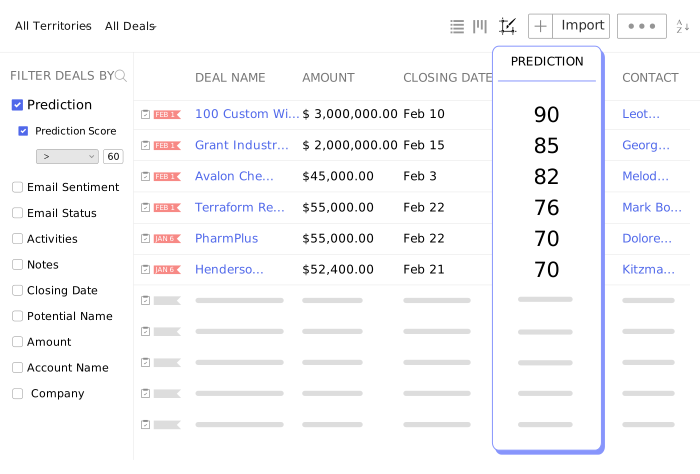
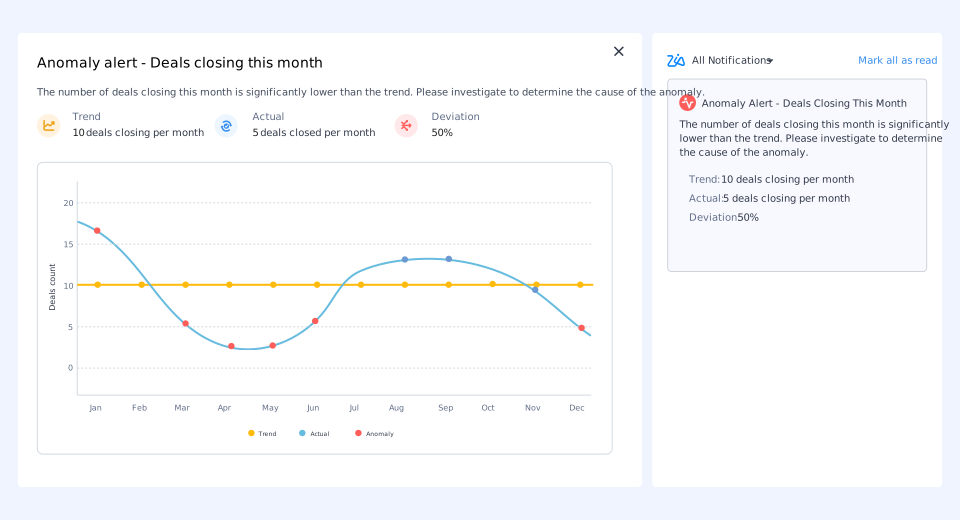
Anomaly detection. When something in the sales data breaks from normal patterns — a sudden drop in calls made, deal velocity slowing in a specific stage, a rep’s close rate shifting unexpectedly — Zoho Zia anomaly detection surfaces it as an alert. This is genuinely useful for sales managers who cannot monitor every metric dashboard manually.
Best time to contact. Zia tracks response patterns per contact and segment, then suggests optimal outreach windows. Not generic advice — specific recommendations based on actual engagement history in the account.
Conversation intelligence. On higher tiers, Zia transcribes and analyzes sales calls, identifying topics discussed, customer sentiment, and whether key deal criteria were addressed. This is the capability most closely competing with standalone tools like Gong or Chorus — included in the CRM subscription rather than sold as a separate platform.
Email intelligence. Zia reads email threads and surfaces context — what was promised, what questions remain open, what the sentiment of the last message suggests about deal health.
What Zia does not do in CRM: it does not generate email drafts, write proposals, or function as a conversational assistant in the ChatGPT sense. It reads structured data and surfaces patterns. Teams expecting a generative AI embedded in their CRM will find Zia’s approach more analytical and less creative — which is either a strength or a limitation depending on the workflow.
How to Use Zoho Zia for Predictive Sales Analytics — Practically
The question of how to use Zoho Zia for predictive sales analytics comes up consistently among new users. The short answer: Zia needs data to learn from, which means it becomes more accurate and more useful the longer it runs.
In the first weeks, Zia operates on limited history and its predictions carry less weight. After 60–90 days of active pipeline data, lead scores and deal predictions become meaningfully reliable. The practical implication is to treat Zia as a system that improves over time, not a day-one replacement for human judgment.
Find the setup inside the CRM admin panel — enabling Zia, connecting it to the relevant modules, and configuring which signals it should weight. Zoho’s documentation covers this in detail, and no external technical resources are needed.
Zia in Zoho Desk — Automating Customer Support with Zoho AI
Inside Zoho Desk, Zia operates in a different mode entirely. Automating customer support with Zoho AI here means reducing the time between ticket arrival and resolution without reducing the quality of the response.
When a support ticket arrives, Zia reads the content, classifies the topic and urgency, and searches the knowledge base for relevant articles before a human agent opens the ticket. The agent sees Zia’s suggested response alongside the ticket — not a mandatory draft, but a starting point they can use, modify, or discard.
Sentiment analysis runs continuously on incoming tickets. Zia flags conversations where customer frustration is escalating, allowing supervisors to intervene before a negative interaction compounds. On teams handling high ticket volume, this early-warning signal is practical rather than theoretical.
Zia also identifies recurring topics across ticket clusters — a pattern that helps support managers know which knowledge base articles to prioritize or which product issues need escalation.
Zia in Zoho Analytics — Querying Business Data in Plain English
Zoho Analytics is a standalone business intelligence platform included in Zoho One and in CRM’s Ultimate tier. The Zia layer here allows natural language queries against connected data — asking “which product line had the highest margin last quarter by region” returns a chart rather than a spreadsheet formula.
This is the Zia capability that most directly competes with AI query features now appearing in Microsoft Copilot for Excel or Google Duet in Sheets. The key difference: Zoho Analytics connects to 500+ data sources — not just Zoho’s own apps, but Google Ads, Shopify, Stripe, and dozens of external platforms. Hidden AI features in Zoho One tend to surprise users most here, because cross-source querying at this level is not what most people expect from a $37/user subscription.
For businesses managing data across multiple tools and tired of manually combining exports into spreadsheets, this cross-source intelligence layer is where Zoho Analytics earns serious consideration independent of the rest of the platform.
Zia in Zoho Books — The Accounting Assistant That Gets Smarter
Inside Zoho Books, Zia’s role is narrower and more practical. It automates transaction categorization based on learned patterns from manual corrections, reducing reconciliation time on ongoing accounting. Over several months, categorization accuracy improves as the system builds a history specific to the account.
This is not the most dramatic AI capability on the list — but it is consistently the one that saves the most time for small business owners doing their own books without a full-time accountant.
Zoho Zia AI Review: Open Ecosystem, External Integrations
One question worth addressing directly for readers who follow the AI tools space: is Zoho a closed ecosystem, or does it connect with external AI systems?
The answer is both — and the balance has shifted toward openness in recent years. Zoho has published APIs across its product suite, and Zoho Flow (its workflow automation tool, included in Zoho One) connects to 900+ external applications. A business can pipe CRM data into an external AI tool, pull enriched results back in, and trigger actions — without writing custom code.
Zoho CRM also has native integrations with OpenAI, allowing teams to layer GPT-based content generation (email drafts, call summaries, proposal text) alongside Zia’s analytical functions. These two AI layers are not in competition inside Zoho — they address different workflows, and both run simultaneously. Zoho Zia productivity hacks for small teams increasingly involve this combination: Zia for intelligence and pattern recognition, GPT integration for content generation.
For businesses building with the current wave of AI agent tools, Zoho Creator — a low-code development platform included in Zoho One — allows custom application development with API connections to external models. It is not the most flexible developer environment, but it is functional for teams that want custom AI-powered workflows without leaving the Zoho infrastructure.
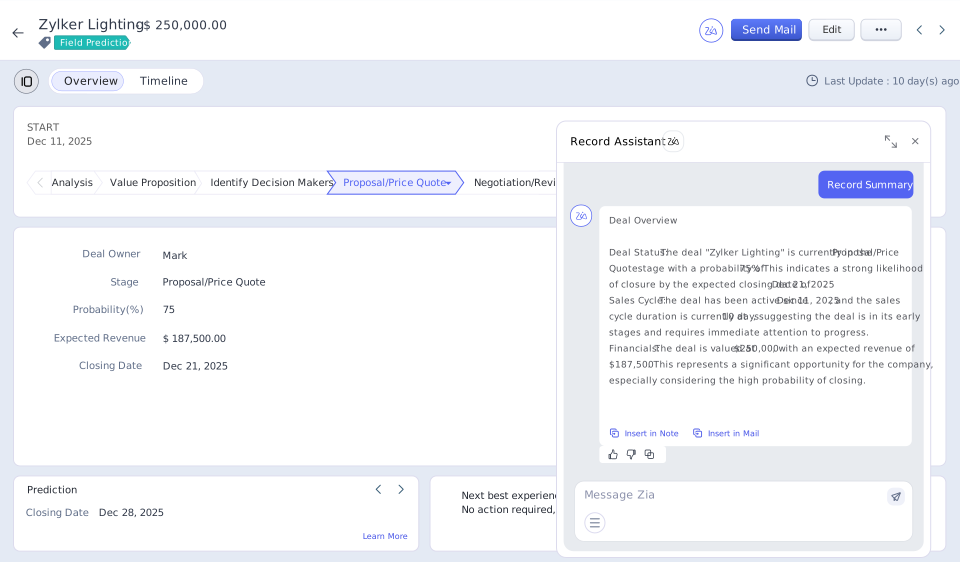
Workflow Automation in Action — What the AI Handles Day to Day
The AI features covered in this Zoho Zia AI review are most impressive when seen as part of a connected workflow rather than as isolated capabilities. Here is what a typical day looks like for a small business running on Zoho One with Zia active:
A new lead comes in through a website form. Zia scores it immediately based on firmographic and behavioral signals. If the score exceeds a set threshold, a workflow automatically assigns the lead to a specific rep and schedules an outreach task. The rep opens the lead record and sees Zia’s suggested best time to make contact, along with any similar historical deals for context.
Later, a support ticket arrives from an existing customer. Zia classifies it, pulls three relevant knowledge base articles, and flags a medium frustration score on the sentiment analysis. The system notifies a supervisor. The agent responds using one of Zia’s suggested replies, modified slightly for tone.
At end of day, the sales manager opens the analytics dashboard and asks Zia in plain English why the conversion rate dropped in the last two weeks. Zia surfaces the anomaly it had already detected — a specific deal stage where leads are stalling — and cross-references it against the calendar to show it correlates with a period when two reps were out.
None of this required a separate AI subscription, a Zapier workflow, or a developer. That is the genuine value proposition — not that Zia is the most capable AI system available, but that it is embedded in the place where the work actually happens.
Zoho Zia vs. Salesforce AI vs. HubSpot Breeze — The SMB Comparison
The AI comparison most relevant to small and mid-size businesses:
Salesforce AI is a capable and deeply integrated AI system built for enterprise scale. It is also priced accordingly. AI features appear at the Enterprise tier ($165/user/month) and above. For SMBs, the total cost of a Salesforce deployment with AI enabled typically runs $200–400/user/month when support, storage, and add-ons are included. Zoho Zia vs Salesforce AI for SMBs is not a close comparison on price — it is a category difference.
HubSpot Breeze is HubSpot’s AI layer, available across its CRM, marketing, and service products. HubSpot’s free CRM is genuinely useful, and Breeze AI features surface in Pro and Enterprise tiers. HubSpot Pro Suite runs approximately $1,200–$1,600/month for small teams on annual billing. The AI features are well-designed, particularly for marketing workflows. Zoho One AI features vs HubSpot Breeze comes down to breadth vs. depth: Zoho covers more business functions at lower cost; HubSpot’s marketing AI is more sophisticated for teams where marketing automation is the primary use case.
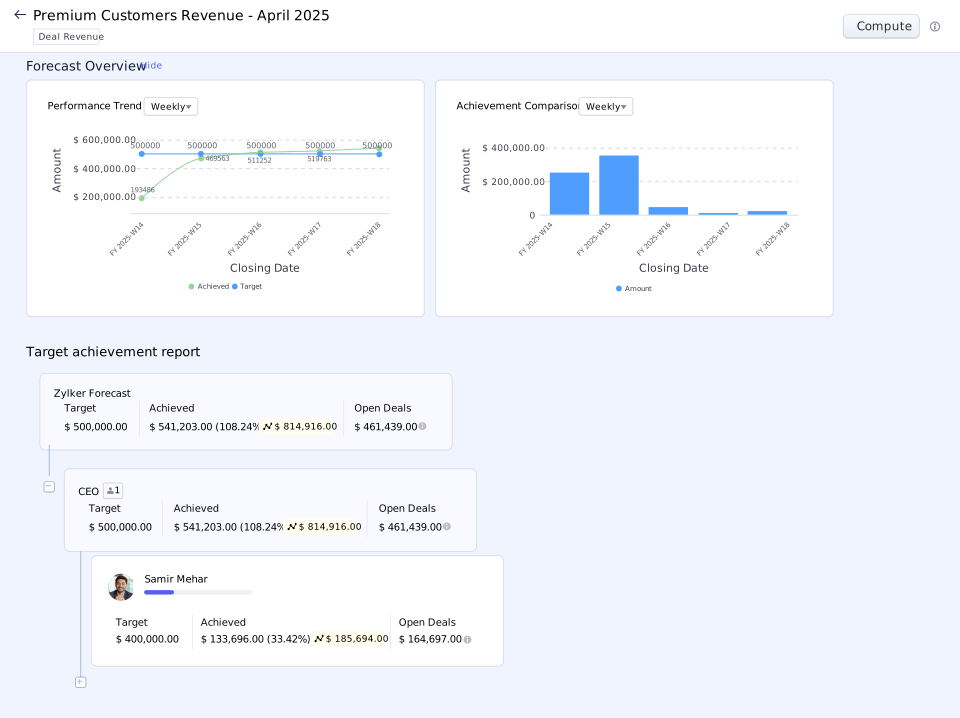
Zoho Zia appears in full on Zoho CRM Enterprise (~$40/user/month) and above, and is included across the platform in Zoho One at $37–$90/user/month. The feature depth is narrower than Salesforce AI’s top enterprise tiers. At equivalent price points, however, Zia’s lead scoring, anomaly detection, and analytics intelligence are not matched by any comparable platform.
The honest Zoho Zia AI review framing: Zia does fewer things than Salesforce AI. It does more than most businesses under 200 employees will ever use, at a cost that does not require a board decision. As an affordable alternative to high-end AI sales tools, Zoho consistently wins the per-feature cost comparison.
Is Zoho AI Worth the Upgrade — Honest Assessment
The question of Zoho AI pricing: is Zia worth the upgrade — the Zoho Zia AI review answer depends entirely on which tier the upgrade is from.
From Zoho CRM Standard to Enterprise: the jump is roughly $26/user/month on annual billing.
For a team of 5, that is $130/month more — and it unlocks the full Zia feature set including lead scoring, deal predictions, and anomaly detection. For a sales team that closes enough deals to justify CRM software at all, $130/month in exchange for predictive pipeline intelligence is almost certainly worth evaluating on a trial basis.
From separate SaaS tools to Zoho One: the calculation is different, and it depends on what is being replaced. If the current stack includes a CRM, accounting software, email platform, support desk, and project management tool — all on separate invoices — the math changes fast. Zoho One at $37/user/month typically produces meaningful savings within the first year, before AI functionality is even factored in.
For teams that only need one specific tool, the upgrade math is different. Starting with a standalone Zoho app and expanding later is a legitimate path that Zoho’s pricing structure accommodates.

What Zoho Does Well — And Where It Falls Short
Genuine strengths:
The integration between Zoho applications is real and functional.
When a deal closes in CRM, Zoho Books can generate the invoice automatically.
When a support ticket is raised by an existing customer, Zoho updates their CRM record with the interaction history. Add a new employee in Zoho People. Their Cliq account and email are provisioned automatically. This cross-application automation — without a third-party middleware layer — is where Zoho One’s architecture pays off most clearly for a best AI CRM for automated lead scoring and workflow automation.
The value density is genuine. No other vendor packages accounting, CRM, HR, support, marketing, and collaboration under a single subscription at sub-$100/user pricing with AI included.
Real limitations:
Implementation takes time. Zoho One is not a plug-and-play solution. Getting ten applications configured, integrated, and automated takes weeks. Making them actually reflect how a business operates takes longer. Teams without a technical lead typically underutilize the platform for months. A dedicated Zoho partner shortens that gap. Zoho’s Jumpstart onboarding packages reduce this gap but add upfront cost.
Interface consistency is uneven. Zoho has 25 years of product history, and it shows in places. CRM and Desk have received consistent UI investment and feel modern. Some older modules feel visually dated by comparison. This is improving with each product cycle but is still noticeable when moving between applications.
Support coverage on the base plan is 8 hours a day, 5 days a week. For businesses that operate internationally or outside standard hours, upgrading to Premium support (20% of subscription cost) or Enterprise support (25%) is a real additional expense.
Zia’s generative capabilities are limited compared to the current wave of AI writing and content tools. Teams expecting ChatGPT-style functionality built into their CRM will find Zia more analytical than generative. The OpenAI integration bridges this gap, but it needs separate configuration.
Who Should Evaluate Zoho Seriously
Strong fit:
Small and mid-size businesses currently running on three or more separate SaaS subscriptions. Companies where sales, finance, support, and operations need to share data without manual exports or middleware. Budget-conscious organizations that need enterprise-level functionality at non-enterprise pricing. Teams in regions where Zoho’s local compliance features — GST, local payroll regulations, multi-currency — are relevant. Content strategists and business owners tired of paying extra for AI.
Worth thinking through carefully:
Very early-stage startups that only need one specific tool right now. Companies deeply embedded in Salesforce or HubSpot with years of custom workflows, where migration cost is a serious consideration. Teams that need the most advanced AI features of a specific category — sophisticated marketing automation, for instance, where dedicated platforms still lead on pure feature depth.
Final Zoho Zia AI Review Verdict — Is Zoho the Smart Choice?
Zia may be the most underrated AI feature in small business software. Not because it lacks capability — but because it arrived quietly, embedded in a platform people already use, without a separate launch event or a five-figure price tag.
Zoho is not trying to win on design aesthetics or conference keynote moments. What this Zoho Zia AI review finds is comprehensive, integrated business software at a price that makes the per-feature cost of competitors difficult to justify on a spreadsheet.
The Zoho Zia AI review question — is Zoho’s native AI actually competitive in 2026? — has a nuanced answer. Zia is not competitive with the most advanced enterprise AI systems from Salesforce or Microsoft at the top of their respective pricing tiers. As an affordable AI CRM option for small and mid-size businesses, however, Zia’s lead scoring, anomaly detection, workflow automation, and cross-platform analytics intelligence are not matched by any comparable platform at this price point.
For a business owner managing sales, support, invoicing, and team communication across four separate platforms and four separate invoices, Zoho One represents a genuine consolidation opportunity. The AI comes with it — not as an upsell, not as a separate tier, not as a future roadmap item.
The 30-day free trial covers the full feature set with no credit card required. That is the most useful starting point for anyone still deciding whether Zia’s capabilities justify the switch.
If you plan to explore Zoho’s ecosystem, it pays to sign up through our link — eligible customers can receive up to $100 in Zoho Wallet credit to use across Zoho’s services.
Want More From This Zoho Zia AI Review?
Zoho One handles CRM, finance, HR, and support — but no single platform covers every growth channel. For businesses also managing social media conversations and lead capture through Instagram or WhatsApp, the ManyChat review breaks down how chat marketing automation complements a CRM-first stack like Zoho.
For a broader look at where Zoho fits alongside other platforms built for lean teams, the full AI tools for small businesses collection covers the complete toolkit — from content creation to email marketing and beyond.
Frequently Asked Questions
What is Zoho Zia AI?
Zia is Zoho’s built-in AI assistant, embedded across the Zoho platform — including CRM, Desk, Analytics, and Books. It handles predictive lead scoring, anomaly detection, sentiment analysis, and natural language data queries without requiring a separate subscription or add-on.
Is Zoho Zia AI free?
Zia features are included in paid Zoho plans. Basic Zia capabilities appear in Zoho CRM from the Enterprise tier (~$40/user/month). In Zoho One, Zia is included across all applications starting at $37/user/month on the All-Employee plan — no separate AI license required.
How does Zoho Zia compare to Salesforce AI?
Both are native AI layers embedded in their respective CRM platforms. Salesforce AI is more feature-rich at the top enterprise tiers, but those tiers start at $165/user/month. Zia delivers comparable SMB-relevant capabilities — lead scoring, anomaly detection, forecasting — at a fraction of the cost.
Can Zoho Zia integrate with ChatGPT or other external AI tools?
Yes. Zoho CRM has a native OpenAI integration that adds GPT-based content generation alongside Zia’s analytical features. Zoho Flow also connects to 900+ external applications, making Zoho an open platform rather than a closed ecosystem.
How long does it take for Zia to start making accurate predictions?
Zia learns from your own pipeline data. In the first few weeks, predictions are based on limited history. After 60–90 days of active CRM use, lead scores and deal predictions become significantly more reliable.
Is Zoho One worth it for small businesses?
For small businesses currently paying for three or more separate SaaS tools, Zoho One at $37/user/month (All-Employee, annual) typically delivers meaningful cost savings while adding AI features, cross-app automation, and a single invoice. The 30-day free trial covers the full feature set with no credit card required.
What is the difference between Zoho One All-Employee and Flexible pricing?
All-Employee ($37/user/month annual) requires licensing every person on payroll but offers the lowest per-seat cost. Flexible ($90/user/month annual) allows licensing only active users at a higher per-seat rate. If more than 40% of the workforce needs access, All-Employee almost always wins on total cost.