
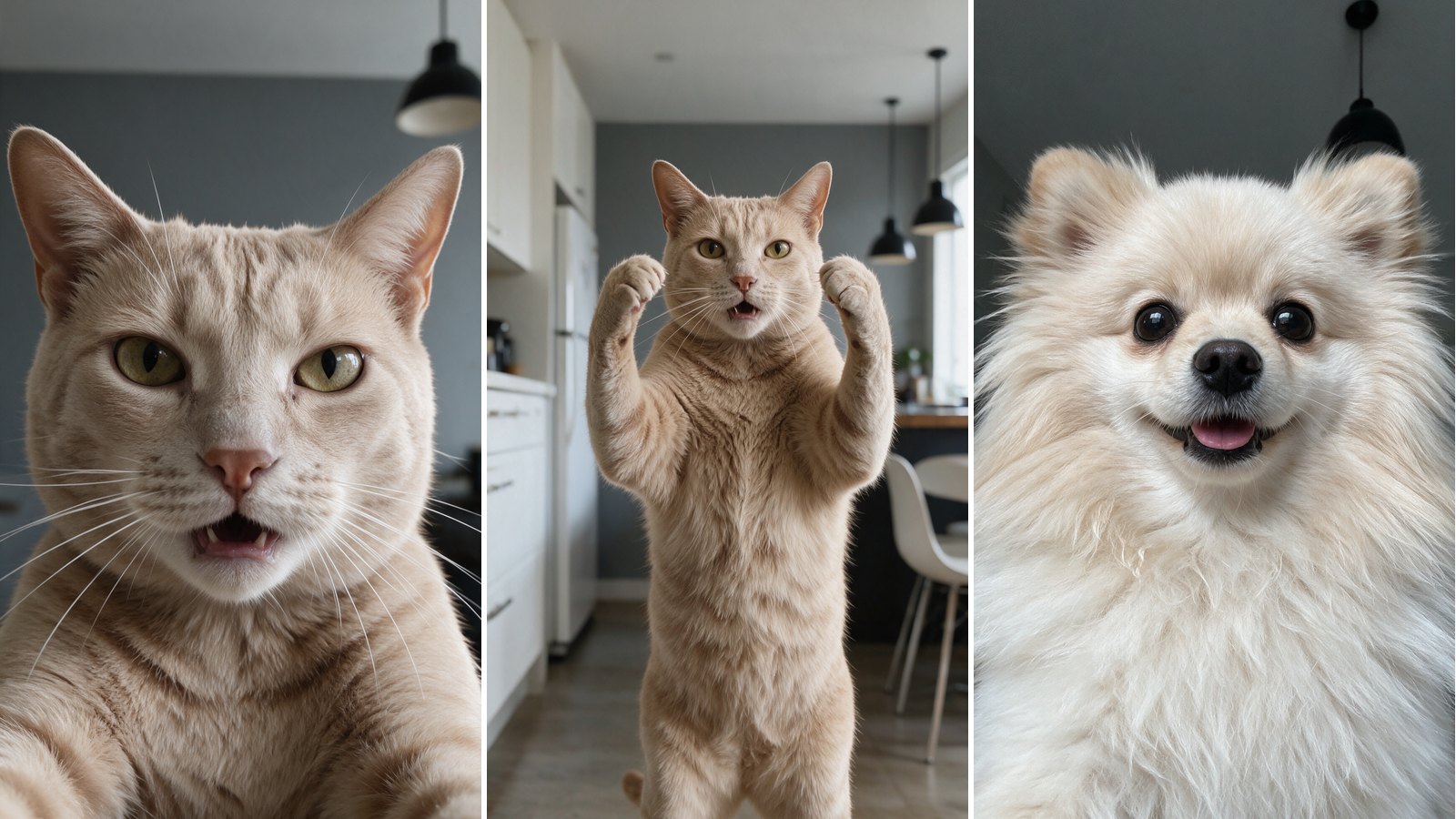
The Bad Times AI Trend Taking Over Pet TikTok
The Bad Times AI trend turns your cat or dog into the star of a very dramatic lip-sync. In short, your pet argues with the camera over a dance track, and it looks oddly real. So how do people make it? You need one photo, one reference clip and the right AI video model.
First, the song. Bad Times by Imael Angel came out on March 30, 2026. According to mymy, it had passed 43.5 million YouTube views by early October. It also reached No. 1 on Shazam’s global chart.
Then came the acting. French creator BOUUH YACHAKA posted a close-up lip-sync on TikTok on August 20, 2026. A second take in her kitchen followed on September 9. When we checked on October 5, the two clips showed 16.2 million and 14.5 million views. After that, pet owners started swapping her for their animals.
We tested four AI video models to copy her performance onto a cat and a Pomeranian. As a result, the prompts below are the exact ones we ran. In addition, we explain which model worked, which ones failed and what each run cost.
The Best Bad Times AI Trend Prompts to Try
The recipe has two parts. First, you create a start frame, a still image of your pet in the pose you want. Then a video model animates that image by copying a reference clip. The three cards below are start frame prompts, all framed 9:16. Attach two or three clear photos of your pet as references, and swap our fur description for your own. Finally, the video card under them holds the animation prompt. That is the whole Bad Times AI trend workflow.
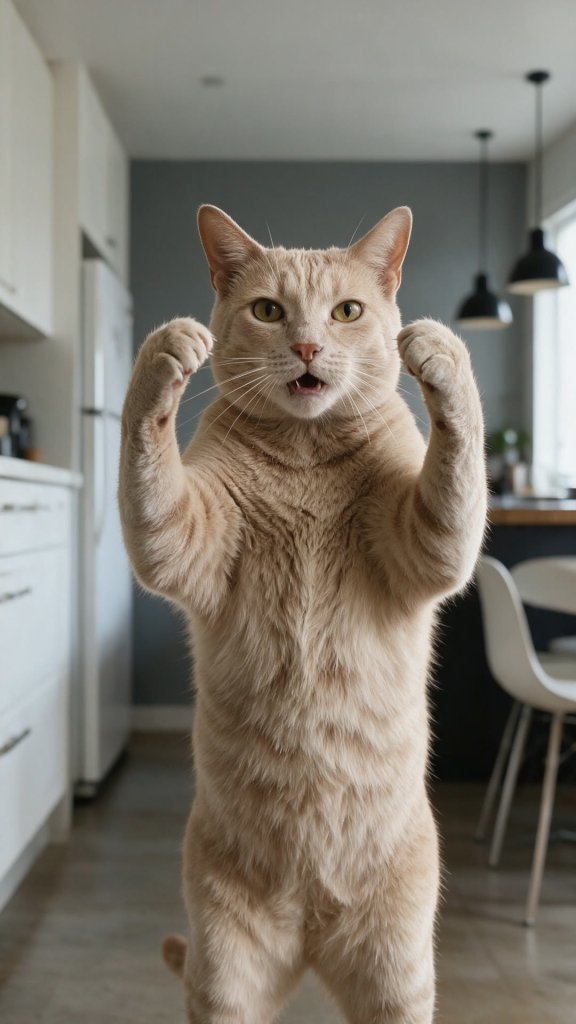
Standing cat in the kitchen
PROMPT
Photorealistic vertical smartphone video frame. The exact same cream-ginger short-haired tabby cat from the reference photos (pale peach-beige fur with faint darker stripes on the forehead, yellow-green eyes, pink nose, long white whiskers) standing upright on its hind legs like a person in the middle of a modern home kitchen, facing the camera, full torso visible from the knees up, both front paws raised up beside its head in a frustrated gesture, mouth slightly open as if talking. Natural cat anatomy and proportions, no clothes.
Background: bright kitchen with white cabinets and fridge on the left, grey wall, dark countertop, black pendant lamps, white chairs on the right. Soft daylight, fixed camera at chest height, sharp focus, realistic phone camera look.





Tip: Match the pose to the first second of your reference clip, so the video starts without a jump.
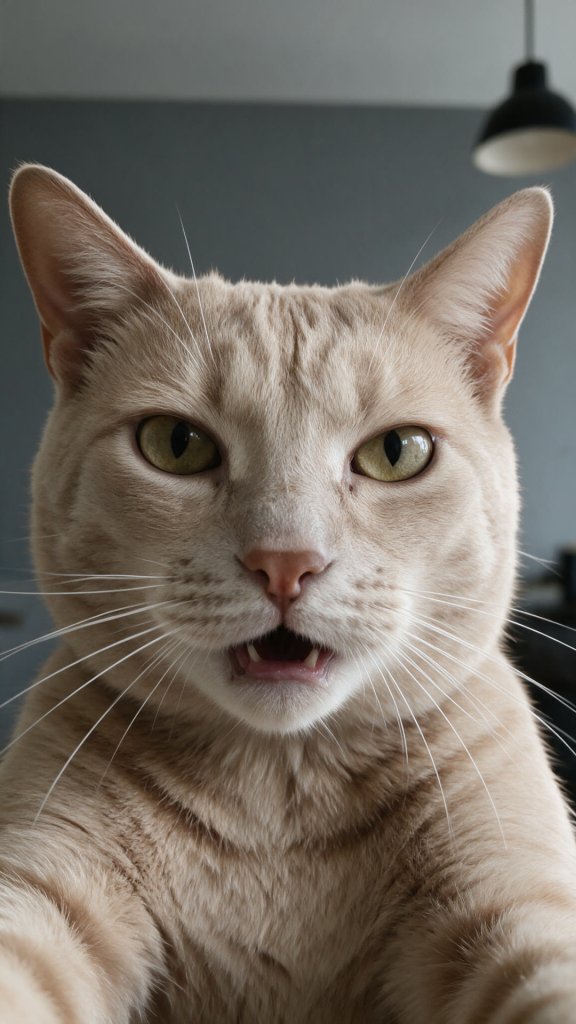
Close-up cat selfie
PROMPT
Photorealistic vertical smartphone selfie video frame, extreme close-up. The exact same cream-ginger short-haired tabby cat from the reference photos (pale peach-beige fur with faint darker stripes on the forehead, yellow-green eyes, pink nose, long white whiskers), head and upper chest filling the frame like a person recording a selfie video, looking straight into the camera with a serious expression, mouth slightly open as if speaking. Natural cat face and anatomy, no clothes.
Background: plain grey wall of the same modern kitchen, black pendant lamp slightly out of focus at the top right. Soft daylight on the face, sharp focus on the eyes, realistic front phone camera look.
Tip: Keep the face large and the background plain. A busy room distracts the video model.
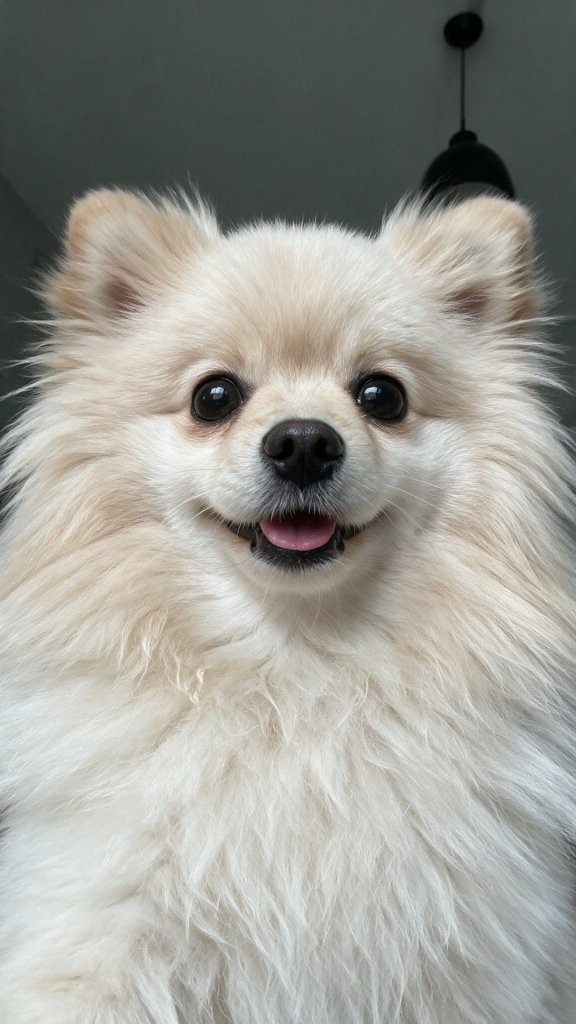
Close-up dog selfie
PROMPT
Photorealistic vertical smartphone selfie video frame, extreme close-up. The exact same small cream Pomeranian dog from the reference photos (very fluffy pale cream and white coat, big fluffy mane around the face, small rounded fluffy ears, round dark shiny eyes, small black nose, short muzzle), its head and fluffy chest filling the frame like a person recording a selfie video, looking straight into the camera, mouth slightly open with the pink tongue just visible as if speaking. Natural dog face and anatomy, no clothes, no collar.
Background: plain grey wall of a modern home, black pendant lamp slightly out of focus at the top right. Soft daylight on the face, sharp focus on the eyes, realistic front phone camera look.
Tip: Describe the coat in detail. Fluffy breeds lose their shape when the prompt is vague.
The video prompt we ran in Wan 3.0
VIDEO PROMPT
One continuous single take, fixed camera, vertical video. Recreate the reference video exactly, but the performer is the cat from the reference image instead of the woman: the same pale cream-ginger short-haired cat with yellow-green eyes, standing upright on its hind legs in the modern kitchen from the reference image.
The cat reproduces the woman's full performance frame by frame with the same timing: every body movement, head turn, foreleg gesture, and above all her exaggerated facial acting, wide eyes, frowns, raised brows and mouth shapes, lip-syncing to the reference audio as if arguing with the camera. Very expressive, animated cat face with clear mouth articulation on every syllable.
The cat keeps real cat anatomy: furry forelegs ending in round fluffy cat paws covered in cream fur, never human hands, no bare skin, no fingers, no jewelry, even when it points or pushes a paw toward the lens. No cuts, no text, no captions or labels on screen.
Tip: Give the model three references per run: up to 15 seconds of the performance clip, your start frame and the same 15 seconds of the song.
How to Make the Bad Times AI Trend Video: What We Learned
So, which model should you pick for the Bad Times AI trend? We ran the same reference clip through four of them on Magnific. However, only one gave us a clean cat from start to finish.
Bad Times AI Trend Video Tutorial: The Whole Recipe in 2 Minutes
Prefer to watch first? This two minute video shows the three finished clips with the original sound, then walks through all four steps.
Which AI Video Model Works Best?
Kling 3.0 Motion Control copied the movement closely. However, it drew human hands with fingers on the cat. It also rejected the close-up where only a face is visible. Kling 3.0 Omni handled the close-up. Still, the fingers came back whenever an open palm moved toward the lens.
Meanwhile, Seedance 2.5 refused our reference clip at the moderation step, most likely because it shows a real person. Wan 3.0, on the other hand, accepted the clip, kept the fur color stable and drew furry paws. Therefore, every finished video on this page comes from Wan 3.0.
| Model | What happened in our test | Cost at 720p |
|---|---|---|
| Wan 3.0 | Accepted the clip, furry paws, stable fur color | 200 credits per second |
| Kling 3.0 Omni | Good close-up, human fingers near the lens | 105 credits per second |
| Kling 3.0 Motion Control | Precise motion, human hands, no face-only shots | 110 credits per second |
| Seedance 2.5 | Blocked the real-person reference clip | 520 credits per second |
Split the Clip and Overlap the Cuts
In our runs, Wan 3.0 took up to 15 seconds of reference video at a time. As a result, the full 58 second performance needed four runs. Each run starts a little differently, so plain cuts between them jump.
For that reason, we generated an extra 5 second bridge across every cut. Next, we looked for the frame where two takes matched best, cut there and added a four frame dissolve. Finally, we laid the original audio back on top, because both of her clips use the same sound.
Where to Run Wan 3.0
We made everything on Magnific, where Wan 3.0 sits next to Kling and Seedance under one credit balance. A 15 second run at 720p cost us 3,000 credits. So test your start frame with a 5 second run first. Alternatively, Pollo AI also lists Wan 3.0 among its models.
Want it sharper? We upscaled the 720p result to 4K for free with Real-ESRGAN on a home graphics card. It took about 90 minutes for 58 seconds of video. Also, the song and the performance belong to their creators. So credit both and keep your clip a fan remix.
Now it is your turn to join the Bad Times AI trend. Pick a start frame prompt, grab a reference clip and let your pet argue back. For another remix built the same way, read our Hotel Lobby AI trend breakdown. You can also browse more step by step guides in our How To section.
Try Wan 3.0 on MagnificWant More?
Loved watching your pet throw a tantrum on beat? Then keep creating. Compare the best AI video generators for your next clip, or start from a still with the best AI image generators.
Prompt inspiration is a story from mymytune.com, source.
Frequently Asked Questions
What is the Bad Times AI trend?
It is a pet remix of a viral lip-sync. Creators take a clip of someone acting out the song Bad Times. Then an AI video model swaps that person for a cat or a dog. As a result, the pet copies every head turn and mouth shape.
What song is used in the Bad Times AI trend?
The track is Bad Times by Imael Angel, released on March 30, 2026. According to mymy, it passed 43.5 million YouTube views by early October 2026. It also reached No. 1 on Shazam’s global chart.
Which AI model is best for the Bad Times AI trend?
In our test, Wan 3.0 gave the cleanest result. It accepted the reference clip, kept the fur color stable and drew furry paws. Kling added human fingers, while Seedance 2.5 blocked the clip.
Can I make the Bad Times AI trend for free?
Not the full minute. A 15 second Wan 3.0 run at 720p cost us 3,000 Magnific credits. Therefore, a 58 second video needs a paid plan. However, a 5 second test is a cheap way to check your start frame first.
Why does my pet get human hands in the video?
Usually, the model copies the performer’s hands too literally. For example, Kling drew fingers whenever an open palm moved toward the lens. Therefore, ask for furry paws in the prompt. Then pick a model that follows it, such as Wan 3.0.
How long can a Bad Times AI trend video be?
The original performance runs 58 seconds. In our runs, Wan 3.0 took up to 15 seconds of reference video at a time. So we made four runs and joined them. Short bridge clips over each cut keep the joins smooth.
Do I need to credit the original creators?
Yes, you should. The song belongs to Imael Angel and the performance to the creator you copy. So name both in your caption and present the clip as a fan remix.